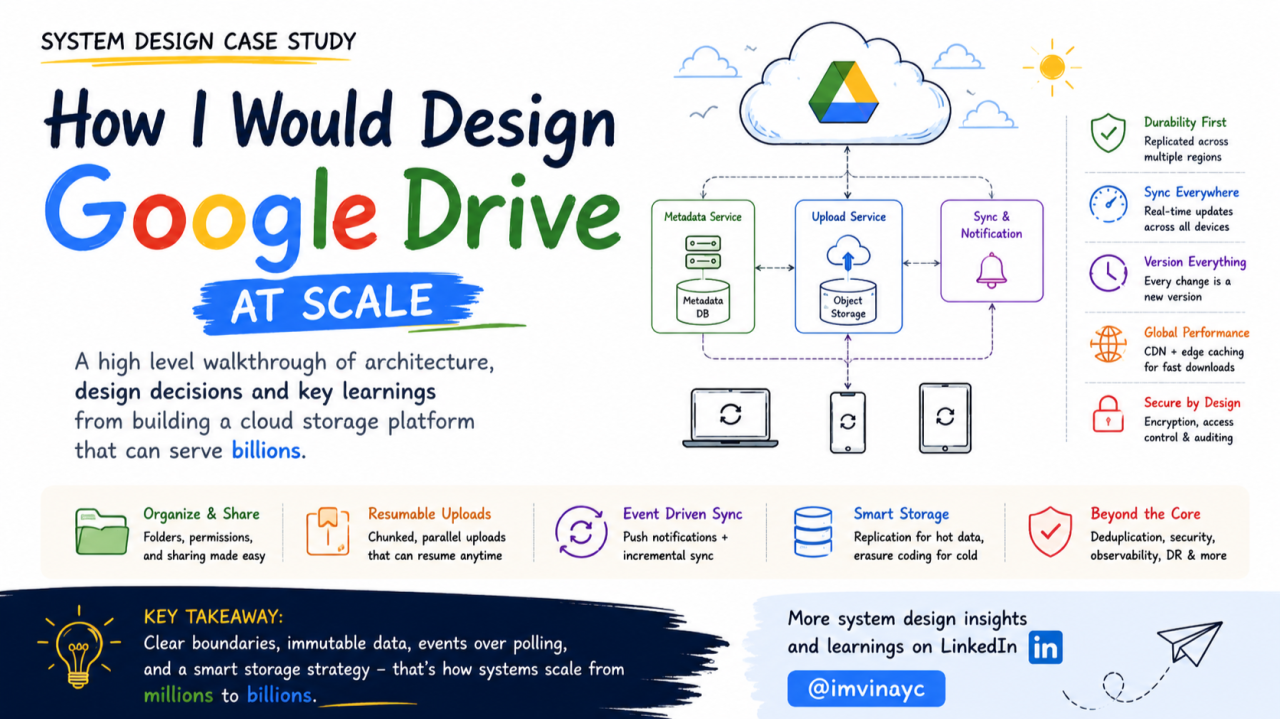
Infographic
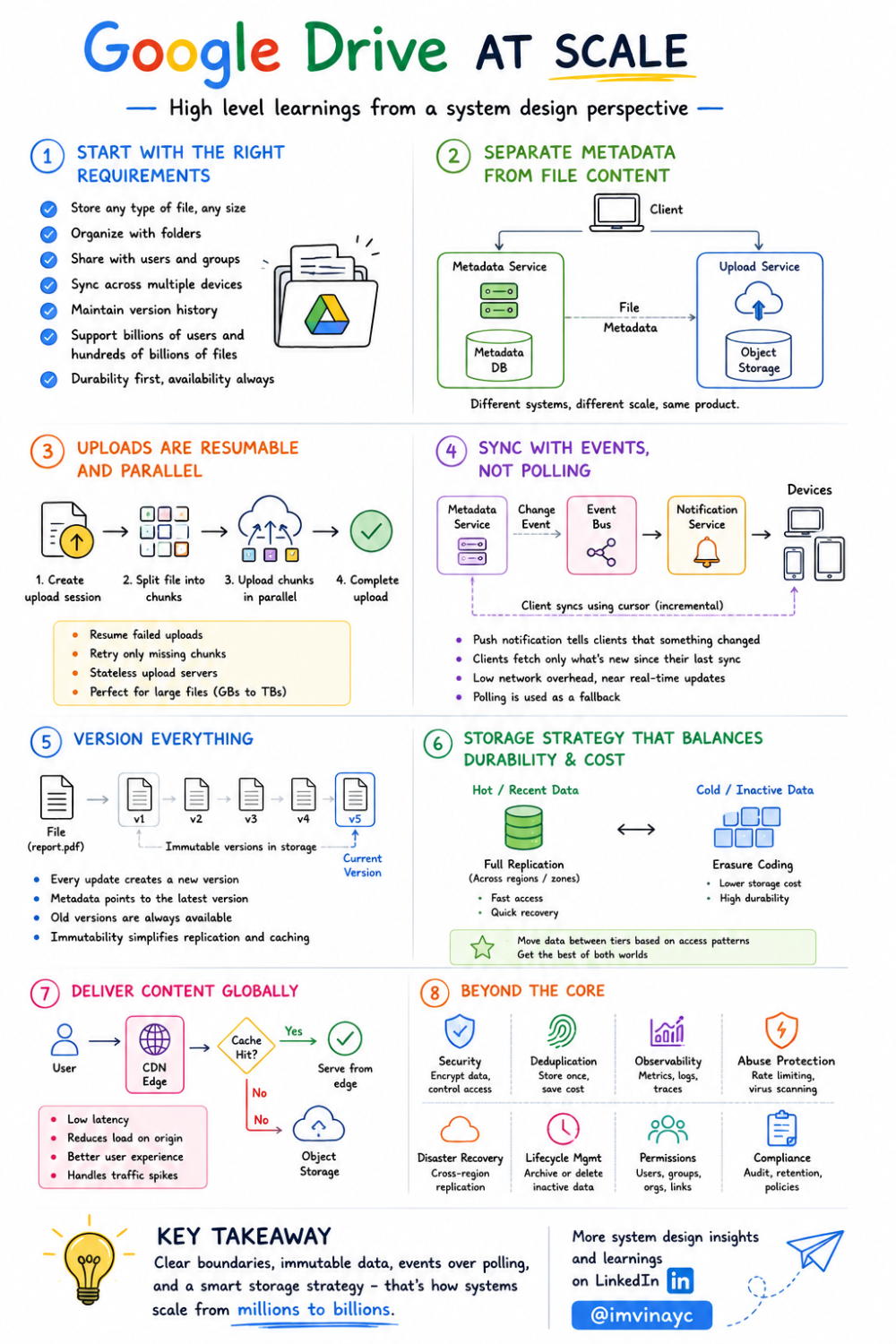
Google Drive - System Design - By Vinay C - infographic
System design discussions often drift into naming tools. I prefer starting from the product behavior and letting the architecture follow from that.
This isn’t Google’s actual implementation. It’s how I would approach designing a system like Google Drive based on the requirements and tradeoffs we discussed.
Requirements
At a high level, the system should support:
- Upload and download files of any size (KBs to 100s of GBs)
- Organize files into folders
- Share files with users or groups
- Synchronize changes across multiple devices
- Maintain version history
- Handle billions of users and hundreds of billions of files
- Provide high durability (data loss is unacceptable)
- Remain available even during partial failures
Core Idea: Separate Metadata from File Content
The first decision that simplifies everything else is separating metadata from actual file bytes.
Metadata includes:
- File name
- Owner
- Folder hierarchy
- Permissions
- Current version pointer
- Size, timestamps
File content is stored separately in object storage.
 Client
                   |
          +--------+--------+
          |                 |
   Metadata Service    Upload Service
          |                 |
    Metadata DB      Object Storage
This separation allows:
- Metadata to be optimized for low-latency queries
- File storage to be optimized for throughput and durability
Trying to combine both in one system usually leads to compromises.
Metadata Storage: SQL vs NoSQL
Metadata access patterns are structured and relational:
- List files in a folder
- Check permissions
- Update version pointers
- Maintain consistency during updates
Because of this, I would lean toward a distributed SQL database (like Spanner, CockroachDB, or a sharded MySQL setup).
Why SQL:
- Strong consistency for operations like rename, move, and version updates
- Support for transactions (important for multi-step updates)
- Easier to enforce constraints (e.g., folder hierarchy)
A document store like MongoDB could work, but handling relationships (folders, permissions, sharing) becomes more complex over time.
Sharding Strategy
At this scale, metadata cannot live in a single database.
I would shard primarily by owner (userId).
Shard A → Users 1–10M
Shard B → Users 10M–20M
Why user-based sharding:
- Most operations are user-scoped (list my files, upload my file)
- Reduces cross-shard queries
- Keeps folder hierarchy localized
What about shared files?
Sharing introduces cross-user access. Instead of duplicating metadata across shards:
- Keep the file owned by the original user’s shard
- Maintain a separate permission index to map users → accessible files
This avoids consistency issues from duplication.
Permissions Model
Permissions are more complex than they look.
A simple structure could be:
Permission
-----------
resourceId (file/folder)
principalId (user/group)
role (viewer/editor/owner)
Key considerations:
- Support both user-level and group-level sharing
- Inheritance from folders (files inherit folder permissions)
- Efficient lookup: “what files can user X access?”
To support fast queries, I would:
- Store permissions separately from file metadata
- Maintain indexes for reverse lookups (user → files)
Caching frequently accessed permissions is also important to reduce DB load.
Upload Flow (Handling Large Files)
Uploading large files in one request is not practical.
Instead:
- Client requests an upload session
- Server returns:
- Client splits file into chunks
- Uploads chunks in parallel
- Server tracks uploaded chunks
- Client completes upload
Benefits:
- Resume uploads after failure
- Retry only failed chunks
- Parallel uploads improve throughput
Client

Chunk1 ─────► Upload Service ─────► Object Storage
Chunk2 ─────► Upload Service ─────► Object Storage
Chunk3 ─────► Upload Service ─────► Object Storage
Stateless Upload Service
Upload servers should not store state in memory.
Upload session state is stored in a durable store:
UploadSession
--------------
uploadId
chunkStatus
expiry
This allows any server to continue the upload if another fails.
Data Integrity
Each chunk should include a checksum.
Flow:
- Client computes checksum
- Server verifies after upload
- Rejects corrupted chunks
This prevents silent data corruption during transfer.
Finalizing Upload
Once all chunks are uploaded:
- Object storage finalizes the object (multipart compose)
- Metadata service creates a new file version
- File record is updated to point to the latest version
Important: metadata is updated only after successful upload completion.
Versioning
Instead of overwriting files, every update creates a new version.
File
   |
Current Version → Version 5
                     |
                Object Storage
Benefits:
- Easy rollback
- No risk of partial overwrite
- Simplifies caching and replication
Synchronization Across Devices
Polling every few seconds doesn’t scale.
Instead, I would use:
- Push notifications for active devices
- Cursor-based incremental sync
Metadata Service
        |
    Event Bus
        |
Notification Service
        |
 Connected Devices
When a change happens:
- Metadata service emits an event
- Notification service pushes a lightweight signal
- Client calls sync API with last cursor
GET /sync?cursor=12345
Server returns only changes after that cursor.
Why cursor instead of timestamps?
- Avoid clock skew issues
- Maintain strict ordering
- Easier pagination
Conflict Handling
If two devices edit the same file offline:
- Both edits are based on the same version
- First upload succeeds
- Second upload detects version mismatch
Instead of overwriting:
- Create a conflict copy (e.g., “file (conflict).pdf”)
For binary files, merging is not practical.
Object Storage Design
File content is stored as immutable objects, meaning once a file (or chunk of a file) is written, it is never modified in place. Any update results in a new object being created, and metadata is updated to point to the latest version. This approach simplifies consistency, enables efficient caching, and makes replication and recovery much easier.
Requirements:
- High durability: Data should survive hardware failures, disk corruption, and even regional outages. This is typically achieved through replication across multiple availability zones or regions, and in some cases, erasure coding for long-term storage efficiency.
- High throughput: The system should support large uploads and downloads, often in parallel. This requires optimized read/write paths, streaming support, and the ability to handle many concurrent requests without bottlenecks.
- Low cost: Since storage grows continuously, cost efficiency becomes critical. Techniques like tiered storage (hot vs cold data), compression, and transitioning older data to erasure-coded formats help reduce long-term storage expenses without compromising durability.
Replication
For newly uploaded or frequently accessed data, replication is the simplest and most reliable approach.
Zone A
Zone B
Zone C
Each object is stored in multiple zones so that even if an entire zone goes down, the data remains available. This protects against disk failures, machine failures, and zone-level outages while keeping read latency low.
Erasure Coding
For data that is accessed less frequently, storing multiple full copies becomes expensive. Instead, the data can be broken into smaller pieces and combined with additional parity pieces.
These pieces are distributed across different storage nodes. Even if some pieces are lost, the original data can still be reconstructed using the remaining ones.
This approach significantly reduces storage overhead compared to keeping full replicas.
Tradeoffs:
- Recovery takes longer because data needs to be reconstructed
- Additional CPU and network resources are required during reconstruction
Downloads and CDN
Serving all downloads from origin storage doesn’t scale.
Introduce CDN selectively:
Client
   |
 CDN Edge
   |
Object Storage
I wouldn’t put every file behind the CDN. It makes sense mainly for:
- Publicly shared files (e.g., links accessed by many users)
- Frequently downloaded content (hot files)
- Large media files where latency matters (videos, images)
For private or rarely accessed files, serving directly from object storage is more cost-efficient.
Benefits of using CDN for the right subset:
- Lower latency for global users
- Reduced load on storage during traffic spikes
- Better handling of viral or highly shared content
Since objects are immutable, caching remains straightforward and avoids consistency issues.
Deduplication (Optional Optimization)
Many users upload identical files.
We can:
- Compute content hash
- Store only one copy
- Multiple metadata entries point to same object
Tradeoff:
- Extra compute during upload
- Complexity in reference counting
Security
At this scale, security is not optional, and it needs to be built into every layer of the system rather than added later.
- TLS for all communication between clients and services
- Encryption at rest for stored objects and metadata
- Strict access checks on every request based on permissions
- Audit logs for file access and sharing actions
- Regular key rotation and secure key management
- Protection against abuse (rate limiting, malware scanning)
Observability and Reliability
To operate this system:
- Metrics: upload latency, error rates, sync delays
- Logs: request tracing
- Alerts: failures, anomalies
Also:
- Cross-region replication
- Backup validation
- Disaster recovery drills
Final Thoughts
What stands out to me is that most complexity comes from scale and failure handling, not from the core idea.
A few decisions simplify everything:
- Separate metadata from file storage
- Use resumable uploads
- Keep objects immutable
- Use event-driven sync instead of polling
- Shard based on user ownership
Once these are in place, the system can grow without needing a redesign.
There are still many tradeoffs (especially around permissions, storage cost, and sync behavior), but this structure gives a solid foundation to build on.
Originally published on LinkedIn.