A practical, code-first introduction to Google's ADK: what it is, the concepts, the building blocks, and a full runnable program at the end.
Infographic in case you have less time
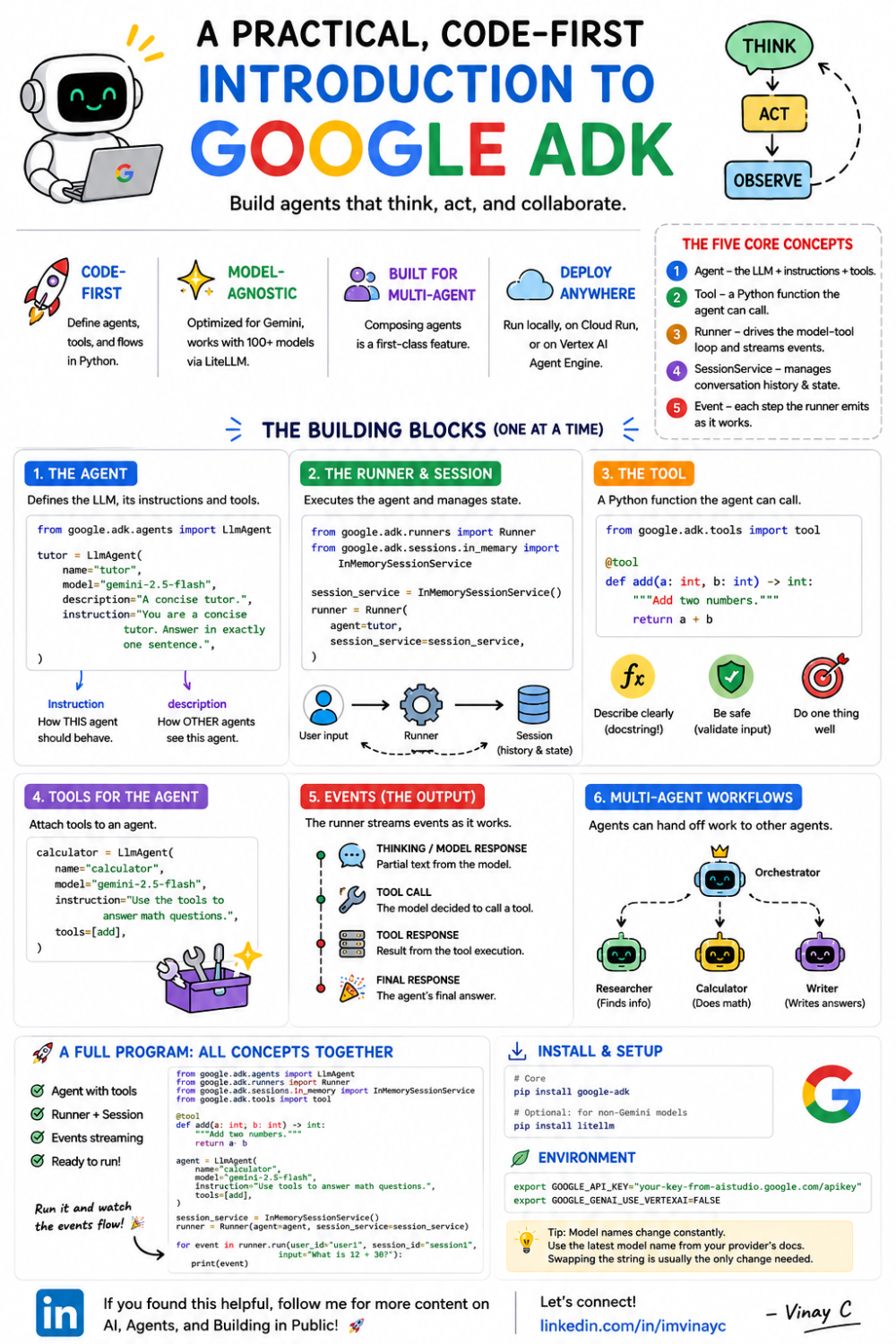
Infographic - Google Agent Development Kit (ADK) for Beginners
Honest Guide — Google Agent Development Kit (ADK) for Beginners
A practical, code-first introduction to Google's ADK: what it is, the concepts, the building blocks, and a full runnable program at the end.
If you've ever wired up an LLM call and then thought "okay, but how do I make it actually do things — call my tools, remember the conversation, hand off to another agent?" — this post is for you. We'll start from the absolute basics, build up ADK's core pieces one at a time with runnable examples, and finish with a single program containing every example, ready to run.
A note before we start: ADK moves fast. It went from public launch (April 2025) to a mature framework with a bi-weekly release cadence, a stable Python line, and a graph-based ADK 2.x generation in a little over a year. This guide targets the modern API. If a tutorial tells you agents are hard to orchestrate or that you must hand-roll the run loop, it predates ADK. We'll use the current patterns and flag the older ones so you don't get confused.
Part 1: The basics (what problem are we even solving?)
What an LLM is, mechanically
A large language model — Gemini, GPT, Claude — is, from your code's point of view, just an HTTP endpoint. You send it some text, it streams back generated text. That's it. On its own it has no memory between calls, can't run your code, can't search the web, and can't touch your files. Each request is independent.
That's fine for a chatbot. It falls apart the moment you want the model to act.
What an "agent" adds
An agent is an LLM wrapped in a loop that lets it do things: you give the model a goal and a set of tools (functions it can call), and it decides — step by step — which tools to call, in what order, looking at each result before deciding the next move. Think → act → observe → repeat. That loop is what makes an agent feel capable rather than just chatty.
Building that loop by hand is where it gets painful. You have to:
- Format tool definitions the way the model expects, then parse the tool calls back out.
- Actually execute the chosen function and feed the result back in.
- Track conversation history and state across turns.
- Handle multiple agents handing work to each other.
- Do all of the above reliably, with logging, and in a way you can deploy.
You can write all of this yourself. A framework gives you these pieces, standardized, so you don't reinvent them. Google's Agent Development Kit (ADK) is one such framework — an open-source, code-first Python toolkit (with Java, Go, TypeScript, and Kotlin versions too) for building, evaluating, and deploying agents.
Part 2: What ADK actually is
ADK is Google's framework for building agents in code. Its pitch, in one line: bring real software-engineering discipline — modularity, testability, version control — to agent development, instead of gluing prompts together.
A few things worth knowing up front:
- Code-first. You define agents, tools, and orchestration as plain Python objects and functions. No YAML-first magic (though a no-code Agent Config option exists). This makes agents testable and reviewable like any other code.
- Optimized for Gemini, but model-agnostic. ADK works best with Gemini and the Google ecosystem, but through LiteLLM it can drive 100+ models — OpenAI, Anthropic, or open models running locally via Ollama or vLLM. You are not locked in.
- Built for multi-agent systems. Composing specialized agents into hierarchies is a first-class feature, not an afterthought.
- Deploy-anywhere. The same agent runs locally, in a container on Cloud Run, or on Vertex AI Agent Engine.
The mental model (learn these five words)
Almost everything in ADK is one of these:
- Agent — the LLM plus its instructions and tools. The thing that decides what to do.
- Tool — a Python function the agent is allowed to call.
- Runner — the engine that actually executes an agent: it takes user input, drives the model-and-tool loop, persists state, and streams back events.
- SessionService — manages conversation history and state, per user and per session.
- Event — each step the runner emits as it works (a tool call, a partial response, the final answer). You iterate over events to see what happened.
Once these click, the rest of ADK is just variations on them.
Installing
You need Python 3.10+. Install the core package:
pip install google-adk

# optional: only if you'll use non-Gemini models (OpenAI, Ollama, etc.)
pip install litellm
Then pick a model backend. The easiest free path is a Google AI Studio key:
export GOOGLE_API_KEY="your-key-from-aistudio.google.com/apikey"
export GOOGLE_GENAI_USE_VERTEXAI=FALSE
Tip: Model names change constantly (gemini-2.5-flash here is a placeholder). Use whatever your provider's docs currently list — swapping the string is usually the only change needed.
Part 3: The building blocks, one at a time
We'll go from a one-line agent to multi-agent workflows. Each step adds exactly one concept.
Building block 1: The Agent
The core class is LlmAgent (you'll also see it aliased as Agent). It bundles a model, an instruction, and — optionally — tools:
from google.adk.agents import LlmAgent

tutor = LlmAgent(
    name="tutor",                       # required, must be a valid identifier
    model="gemini-2.5-flash",           # provider:model string, or a wrapper
    description="A concise tutor.",      # how OTHER agents see this one
    instruction="You are a concise tutor. Answer in exactly one sentence.",
)
Two fields trip up beginners:
- instruction is the system prompt — it tells this agent how to behave.
- description is a short summary used by other agents to decide whether to delegate to this one. It matters only in multi-agent setups, but get in the habit of writing it well.
Building block 2: The Runner and Session (how you actually run an agent)
An agent object doesn't do anything by itself — you don't call agent.invoke(). You hand it to a Runner, which needs a SessionService to hold state. This is the single biggest difference from lighter frameworks, and it's worth internalizing:
import asyncio
from google.adk.runners import Runner
from google.adk.sessions import InMemorySessionService
from google.genai import types

async def main():
    session_service = InMemorySessionService()

    # get-or-create: create_session errors if the id already exists, so check first.
    if await session_service.get_session(app_name="demo", user_id="vinay", session_id="s1") is None:
        await session_service.create_session(app_name="demo", user_id="vinay", session_id="s1")

    runner = Runner(agent=tutor, app_name="demo", session_service=session_service)

    # user input is a structured Content object, not a bare string
    message = types.Content(role="user", parts=[types.Part(text="Explain photosynthesis.")])

    async for event in runner.run_async(user_id="vinay", session_id="s1", new_message=message):
        if event.is_final_response():
            print(event.content.parts[0].text)

asyncio.run(main())
That's a lot of ceremony for "ask a question," and it's the honest tradeoff of ADK: more setup, but you get session management, streaming events, and deployability for free. In practice you write a small ask(...) helper once (the full program at the end does exactly this) and never think about it again.
Gotcha worth knowing early: create_session raises if a session with that id already exists. If you want to reuse a session_id across turns (which is how you get memory — see below), do a get-or-create: call get_session first and only create it when the result is None. The helper in the full program handles this for you.
Tip: run_async yields a stream of events — tool calls, partial tokens, the final answer. Filtering on event.is_final_response() gets you just the reply. When you're debugging, print every event to see the agent's reasoning.
For local dev, you rarely write the runner by hand at all — adk web launches a browser UI, and adk run gives you a terminal chat, both pointing at your agent. More on that below.
Building block 3: Tools
A tool is just a Python function. ADK reads its name, type hints, and docstring — so those are part of the prompt. Write them clearly. Returning a dict (with a status field) is the convention, because it gives the model structured, unambiguous results.
def get_weather(city: str) -> dict:
    """Get the current weather for a given city.

    Args:
        city: The name of the city, e.g. "Tokyo".
    """
    fake_db = {"tokyo": "22C and sunny", "london": "14C and rainy"}
    report = fake_db.get(city.lower())
    if report:
        return {"status": "success", "report": f"It's {report} in {city}."}
    return {"status": "error", "message": f"No data for {city}."}

assistant = LlmAgent(
    name="assistant",
    model="gemini-2.5-flash",
    instruction="You are a helpful assistant. Use tools when they help.",
    tools=[get_weather],          # just pass the function
)
You don't wrap it in a decorator or a class — ADK turns a plain function into a FunctionTool automatically. Ask this agent "what's the weather in Tokyo?" and it will call get_weather("Tokyo"), read the result, and answer in natural language.
ADK also ships built-in tools. The most famous is google_search, which grounds Gemini's answers on the live web:
from google.adk.tools import google_search

researcher = LlmAgent(
    name="researcher",
    model="gemini-2.5-flash",
    instruction="Answer using Google Search when useful.",
    tools=[google_search],
)
Heads-up: Some built-in tools (like google_search) require a Gemini model — they won't work behind a LiteLLM-wrapped OpenAI or local model. Mix your own function tools with built-ins as needed.
Building block 4: State and memory
By default each turn is independent. To make a multi-turn conversation, reuse the same SessionService and session_id across calls — the SessionService persists the history and a shared state dictionary:
session_service = InMemorySessionService()
# ... run "My name is Sam." on session_id="mem"
# ... run "What's my name?" on the SAME session_id="mem"
# -> the agent answers "Sam", because state survived between turns
InMemorySessionService is perfect for learning. For production you swap in a database-backed service (e.g. Vertex AI or a persistent store) so state survives restarts — and because of the shared interface, that's mostly a one-line change.
Tools can read and write this state directly by accepting a tool_context argument:
from google.adk.tools.tool_context import ToolContext

def remember_fact(fact: str, tool_context: ToolContext) -> dict:
    """Store a fact the user wants remembered for later."""
    facts = tool_context.state.get("facts", [])
    facts.append(fact)
    tool_context.state["facts"] = facts
    return {"status": "success", "count": len(facts)}
Building block 5: Multi-agent systems
This is where ADK earns its keep. Instead of one giant agent, you build specialists and give a coordinator the list via sub_agents. The coordinator reads each sub-agent's description and delegates:
greeter = LlmAgent(name="greeter", model="gemini-2.5-flash",
                   description="Handles greetings and small talk.",
                   instruction="Warmly greet the user in one line.")

math_helper = LlmAgent(name="math_helper", model="gemini-2.5-flash",
                       description="Solves arithmetic and math questions.",
                       instruction="Solve the math problem and show the result.",
                       tools=[multiply])

coordinator = LlmAgent(
    name="coordinator",
    model="gemini-2.5-flash",
    instruction="Delegate greetings to 'greeter' and math to 'math_helper'.",
    sub_agents=[greeter, math_helper],
)
Send "Hi!" and the coordinator routes to greeter; send "What is 12 × 12?" and it routes to math_helper. This LLM-driven routing keeps each agent small and focused — much easier to test and reason about than one mega-prompt.
Building block 6: Workflow agents (deterministic orchestration)
Sometimes you don't want the model deciding the order — you want a fixed pipeline. ADK provides workflow agents whose orchestration is deterministic (no LLM picks the path):
- SequentialAgent — runs sub-agents in strict order, passing data along via state.
- ParallelAgent — runs sub-agents concurrently.
- LoopAgent — repeats sub-agents until a condition is met.
The key mechanic is output_key: a sub-agent writes its result to session state under that key, and the next agent reads it with {key} placeholder syntax in its instruction.
from google.adk.agents import SequentialAgent

writer = LlmAgent(name="writer", model="gemini-2.5-flash",
                  instruction="Write a short Python function for the request. Output only code.",
                  output_key="generated_code")

reviewer = LlmAgent(name="reviewer", model="gemini-2.5-flash",
                    instruction="Review this code, 2-3 bullets:\n{generated_code}",
                    output_key="review")

pipeline = SequentialAgent(name="code_pipeline", sub_agents=[writer, reviewer])
The writer runs, its output lands in state["generated_code"], and the reviewer's {generated_code} placeholder is filled from state before it runs. Predictable, testable, no orchestration prompt required.
Note: ADK 2.x introduced more flexible graph-based workflows that generalize these templates. The Sequential/Parallel/Loop agents still work and remain the clearest starting point for beginners — reach for graphs when your flow has branches and conditions the templates can't express.
Building block 7: Model flexibility (LiteLLM & local models)
To use a non-Gemini model, wrap the model string in LiteLlm:
from google.adk.models.lite_llm import LiteLlm

# OpenAI (needs OPENAI_API_KEY)
agent = LlmAgent(model=LiteLlm(model="openai/gpt-4o"), name="a", instruction="...")

# A local model via Ollama — fully offline, no API key
#   ollama pull gemma3
agent = LlmAgent(model=LiteLlm(model="ollama_chat/gemma3"), name="b", instruction="...")
Your surrounding agent, tool, and runner code stays identical. That portability is the payoff for ADK's structure — the same reason the full program at the end runs on either Gemini or a local model with a single boolean switch.
Tip (local models): Small local "reasoning" models like Gemma sometimes leak their internal thinking into the final answer. A one-line fix that works well: append something like "Respond with only the final answer. Do not include your thinking process." to each agent's instruction. It's harmless on Gemini, so you can leave it in everywhere (the full program defines a NO_THINKING string and appends it to every instruction).
Building block 8: The developer UI and callbacks
Two things that make ADK pleasant in day-to-day use:
- adk web launches a local browser UI where you can chat with your agent, watch every tool call and event, and debug the reasoning visually. adk run does the same in your terminal. You point either at a folder containing your agent — no runner code needed.
- Callbacks let you hook into the agent's lifecycle (before/after model calls, before/after tool calls) to add logging, guardrails, PII redaction, or caching — without rewriting the agent. You don't need them on day one, but it's how teams add production controls later.
Part 4: The benefits of using ADK
Now that you've seen the pieces, here's where ADK genuinely earns its place:
- Multi-agent is first-class. Composing specialists with sub_agents, or wiring deterministic pipelines with workflow agents, is built in — not something you bolt on.
- Code-first and testable. Agents and tools are ordinary Python. You can unit-test tools, review agents in a PR, and version everything like normal software.
- Model-agnostic. Optimized for Gemini, but LiteLLM opens the door to 100+ models, including fully local ones. No lock-in.
- Batteries-included tooling. Built-in tools (search, code execution), a real dev UI (adk web), and an evaluation harness (adk eval) ship in the box.
- Deploy-anywhere. The same agent runs locally, on Cloud Run, or on Vertex AI Agent Engine — plus A2A support for agent-to-agent communication across systems.
- Strong Google-ecosystem integration. If you're already on Gemini, Vertex AI, or Google Cloud, the path from prototype to production is short.
Part 5: The honest cons (and when not to use it)
ADK is powerful, but a good beginner guide tells you the tradeoffs:
- More ceremony than lighter frameworks. Runner + SessionService + types.Content is a lot of setup for a single question. For a one-shot LLM call, the provider's own SDK is simpler.
- Google-centric gravity. It works with anything via LiteLLM, but the smoothest, best-documented path assumes Gemini and Google Cloud. Some built-in tools are Gemini-only.
- Fast-moving and young. Frequent releases (roughly bi-weekly) and a major 2.x generation mean tutorials go stale quickly and APIs shift. Pin your version.
- Async-first learning curve. The idiomatic API is async/await and event streams. If you're new to async Python, the run loop feels unfamiliar at first.
- Supply-chain surface. Optional extras pull in large dependency trees (a real LiteLLM supply-chain incident occurred in early 2026). Keep dependencies updated and rotate secrets if you're ever exposed.
Rule of thumb:
- Use ADK when you're building genuinely agentic systems — multiple tools, multiple agents, orchestrated workflows — especially on the Google/Gemini stack, and you want something you can test and deploy.
- Consider something lighter for a single model call, a simple fixed prompt chain, or when minimal dependencies and full control over every millisecond matter more than agent machinery.
Part 6: ADK vs. LangChain / LangGraph, side by side
If you read my LangChain guides, here's how the two compare at a glance. They solve overlapping problems with different philosophies.
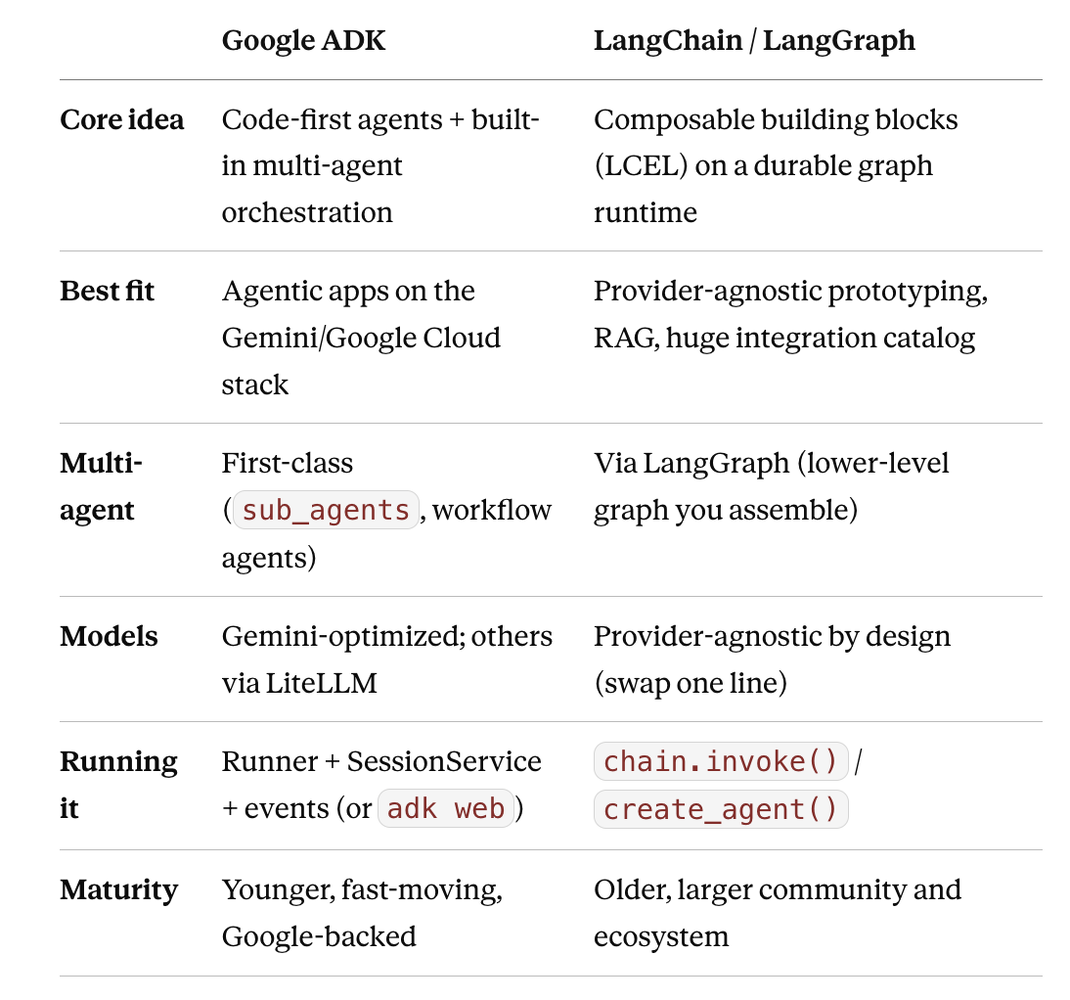
Neither is "better." ADK feels natural if you're building multi-agent systems on Google's stack and want structure and deployability. LangChain/LangGraph shines for provider flexibility, RAG, and its vast integration catalog. Many teams even use both — ADK for orchestration, LangChain tools plugged in underneath.
Part 7: Common beginner pitfalls
- Forgetting the Runner. There's no agent.invoke(). Agents run through a Runner backed by a SessionService. This is the #1 "why isn't this working" moment.
- Passing a raw string as the message. run_async expects a types.Content object, not a plain string. Wrap it: types.Content(role="user", parts=[types.Part(text="...")]).
- Not awaiting / not iterating events. run_async is an async generator. You must async for event in ... inside an async function, and run it with asyncio.run(...).
- Calling create_session twice on the same id. It raises if the session already exists. Use get-or-create (get_session → create only if None) whenever you reuse a session_id for memory.
- Weak tool docstrings. The docstring and type hints are the tool's spec for the model. Vague docstrings cause the model to call tools wrong (or not at all).
- Empty description in multi-agent setups. The coordinator routes based on each sub-agent's description. Leave it blank and delegation gets flaky.
- Following pre-2.x tutorials without checking dates. ADK's API shifts fast. When in doubt, check the version and the official docs at google.github.io/adk-docs.
Conclusion
Google's ADK is best understood not as a chatbot library but as a code-first toolkit for building agents that act — an Agent that decides, Tools it can call, a Runner that executes the loop, and a SessionService that remembers. On top of that foundation it layers first-class multi-agent orchestration, deterministic workflows, a real dev UI, and deploy-anywhere plumbing.
Its strengths are multi-agent support, testability, and tight Google-ecosystem integration. Its costs are more setup ceremony than lighter tools, a Google-centric center of gravity, and a fast-moving API. For serious agentic systems — especially on Gemini — that's an excellent trade. For a single model call, reach for something simpler.
Now that you know the building blocks and the tradeoffs, you can decide for yourself — which is exactly where a beginner should end up.
Because ADK evolves quickly, always cross-check specifics — package names, model strings, and APIs — against the official docs at google.github.io/adk-docs before shipping.
Full code — which actually runs
Everything above, in one file. Install, set one environment variable (or flip a boolean for fully offline mode), and run.
requirements.txt
google-adk
# Optional: only needed if you set USE_OLLAMA = True (or any non-Gemini model)
litellm
adk_for_beginners.py
"""
Google Agent Development Kit (ADK) for Beginners — full runnable program.
Every building block from the article, in one file, runnable top to bottom.

SETUP
  python -m venv .venv && source .venv/bin/activate   # Windows: .venv\\Scripts\\activate
  pip install -r requirements.txt

Pick ONE model backend:
  A) Gemini via Google AI Studio (free key, nothing to install locally)
       export GOOGLE_API_KEY="your-key"          # aistudio.google.com/apikey
       export GOOGLE_GENAI_USE_VERTEXAI=FALSE
     Leave MODEL below as a "gemini-..." string.
  B) A local model via Ollama (offline, no key)
       ollama pull gemma3
       pip install litellm
     Then set USE_OLLAMA = True below.

  python adk_for_beginners.py
"""

import asyncio

from google.adk.agents import LlmAgent, SequentialAgent, ParallelAgent, LoopAgent
from google.adk.runners import Runner
from google.adk.sessions import InMemorySessionService
from google.adk.tools import google_search
from google.adk.tools.tool_context import ToolContext
from google.genai import types

# --- Model selection (one switch changes the whole file) ---
USE_OLLAMA = False

if USE_OLLAMA:
    from google.adk.models.lite_llm import LiteLlm
    MODEL = LiteLlm(model="ollama_chat/gemma3")   # local, no key
else:
    MODEL = "gemini-2.5-flash"                     # needs GOOGLE_API_KEY

APP_NAME = "adk_beginners"
USER_ID = "vinay"

# Local reasoning models (e.g. gemma via Ollama) sometimes leak their internal
# "thinking" into the final answer. Appending this keeps responses clean.
# Harmless on Gemini, so we add it to every instruction.
NO_THINKING = " Respond with only the final answer. Do not include your thinking process."


# --- Reusable helper: send one message to an agent and print the reply. ---
# get-or-create: create_session errors if the id exists, so we check first.
# That lets us reuse a session_id across turns to get memory (Example 4).
async def ask(agent, prompt, session_id, session_service=None):
    session_service = session_service or InMemorySessionService()
    existing = await session_service.get_session(
        app_name=APP_NAME, user_id=USER_ID, session_id=session_id
    )
    if existing is None:
        await session_service.create_session(
            app_name=APP_NAME, user_id=USER_ID, session_id=session_id
        )
    runner = Runner(agent=agent, app_name=APP_NAME, session_service=session_service)
    content = types.Content(role="user", parts=[types.Part(text=prompt)])

    final_text = ""
    async for event in runner.run_async(
        user_id=USER_ID, session_id=session_id, new_message=content
    ):
        if event.is_final_response() and event.content and event.content.parts:
            final_text = event.content.parts[0].text
    print(final_text)
    return final_text


# --- Example 1: A basic agent (Agent + instruction) ---
async def example_1_basic_agent():
    print("\n=== Example 1: A basic agent ===")
    agent = LlmAgent(
        name="tutor", model=MODEL, description="A concise tutor.",
        instruction="You are a concise tutor. Answer in exactly one sentence." + NO_THINKING,
    )
    await ask(agent, "Explain photosynthesis.", session_id="s1")


# --- Example 2: Tools (plain Python functions) ---
def get_weather(city: str) -> dict:
    """Get the current weather for a given city.

    Args:
        city: The name of the city, e.g. "Tokyo".
    """
    fake_db = {"tokyo": "22C and sunny", "london": "14C and rainy"}
    report = fake_db.get(city.lower())
    if report:
        return {"status": "success", "report": f"It's {report} in {city}."}
    return {"status": "error", "message": f"No data for {city}."}


def multiply(a: float, b: float) -> dict:
    """Multiply two numbers together."""
    return {"status": "success", "result": a * b}


async def example_2_tools():
    print("\n=== Example 2: An agent that uses tools ===")
    agent = LlmAgent(
        name="assistant", model=MODEL,
        instruction="You are a helpful assistant. Use tools when they help." + NO_THINKING,
        tools=[get_weather, multiply],
    )
    await ask(agent, "What's the weather in Tokyo, and what is 23 times 77?", session_id="s2")


# --- Example 3: Built-in google_search tool (Gemini only) ---
async def example_3_builtin_tool():
    print("\n=== Example 3: Built-in google_search tool ===")
    if USE_OLLAMA:
        print("Skipped: google_search requires a Gemini model.")
        return
    agent = LlmAgent(
        name="researcher", model=MODEL,
        instruction="Answer questions using Google Search when useful." + NO_THINKING,
        tools=[google_search],
    )
    await ask(agent, "Who won the most recent FIFA World Cup?", session_id="s3")


# --- Example 4: Memory across turns (reuse service + session_id) ---
async def example_4_memory():
    print("\n=== Example 4: Memory across turns ===")
    session_service = InMemorySessionService()
    agent = LlmAgent(
        name="chat", model=MODEL,
        instruction="You are a friendly assistant. Remember what the user tells you." + NO_THINKING,
    )
    await ask(agent, "My name is Sam.", session_id="mem", session_service=session_service)
    await ask(agent, "What's my name?", session_id="mem", session_service=session_service)


# --- Example 5: Multi-agent delegation (sub_agents) ---
async def example_5_multi_agent():
    print("\n=== Example 5: Multi-agent delegation ===")
    greeter = LlmAgent(
        name="greeter", model=MODEL,
        description="Handles greetings and small talk.",
        instruction="You warmly greet the user. Keep it to one line." + NO_THINKING,
    )
    math_helper = LlmAgent(
        name="math_helper", model=MODEL,
        description="Solves arithmetic and math questions.",
        instruction="You solve the math problem and show the result." + NO_THINKING,
        tools=[multiply],
    )
    coordinator = LlmAgent(
        name="coordinator", model=MODEL,
        instruction=("You are a router. Delegate greetings to 'greeter' and math "
                     "questions to 'math_helper'. Do not answer directly." + NO_THINKING),
        sub_agents=[greeter, math_helper],
    )
    await ask(coordinator, "Hi there!", session_id="s5a")
    await ask(coordinator, "What is 12 times 12?", session_id="s5b")


# --- Example 6: Sequential workflow (write -> review via output_key) ---
async def example_6_sequential():
    print("\n=== Example 6: Sequential workflow (write -> review) ===")
    writer = LlmAgent(
        name="writer", model=MODEL,
        instruction="Write a short Python function for the user's request. Output only the code." + NO_THINKING,
        output_key="generated_code",
    )
    reviewer = LlmAgent(
        name="reviewer", model=MODEL,
        instruction="Review this code and give 2-3 bullet points of feedback:\n{generated_code}" + NO_THINKING,
        output_key="review",
    )
    pipeline = SequentialAgent(
        name="code_pipeline", sub_agents=[writer, reviewer],
        description="Writes code, then reviews it.",
    )
    await ask(pipeline, "A function that checks if a number is prime.", session_id="s6")


# --- Example 7: Parallel workflow (concurrent fan-out) ---
async def example_7_parallel():
    print("\n=== Example 7: Parallel workflow ===")
    pros = LlmAgent(name="pros", model=MODEL,
                    instruction="List 2 pros of remote work. Be brief." + NO_THINKING, output_key="pros")
    cons = LlmAgent(name="cons", model=MODEL,
                    instruction="List 2 cons of remote work. Be brief." + NO_THINKING, output_key="cons")
    fan_out = ParallelAgent(
        name="debate", sub_agents=[pros, cons],
        description="Gathers pros and cons at the same time.",
    )
    await ask(fan_out, "Analyze remote work.", session_id="s7")


# --- Example 8: A tool that reads/writes session state via ToolContext ---
def remember_fact(fact: str, tool_context: ToolContext) -> dict:
    """Store a fact the user wants remembered for later."""
    facts = tool_context.state.get("facts", [])
    facts.append(fact)
    tool_context.state["facts"] = facts
    return {"status": "success", "stored": fact, "count": len(facts)}


async def example_8_stateful_tool():
    print("\n=== Example 8: A tool that writes to session state ===")
    agent = LlmAgent(
        name="note_taker", model=MODEL,
        instruction="When the user shares something to remember, call remember_fact." + NO_THINKING,
        tools=[remember_fact],
    )
    await ask(agent, "Remember that my favorite color is blue.", session_id="s8")


async def main():
    await example_1_basic_agent()
    await example_2_tools()
    await example_3_builtin_tool()
    await example_4_memory()
    await example_5_multi_agent()
    await example_6_sequential()
    await example_7_parallel()
    await example_8_stateful_tool()


if __name__ == "__main__":
    asyncio.run(main())
Originally published on LinkedIn.