Enterprise search platforms (Glean and similar): connectors, permissions and enablement
We'll cover the following
Visual summary
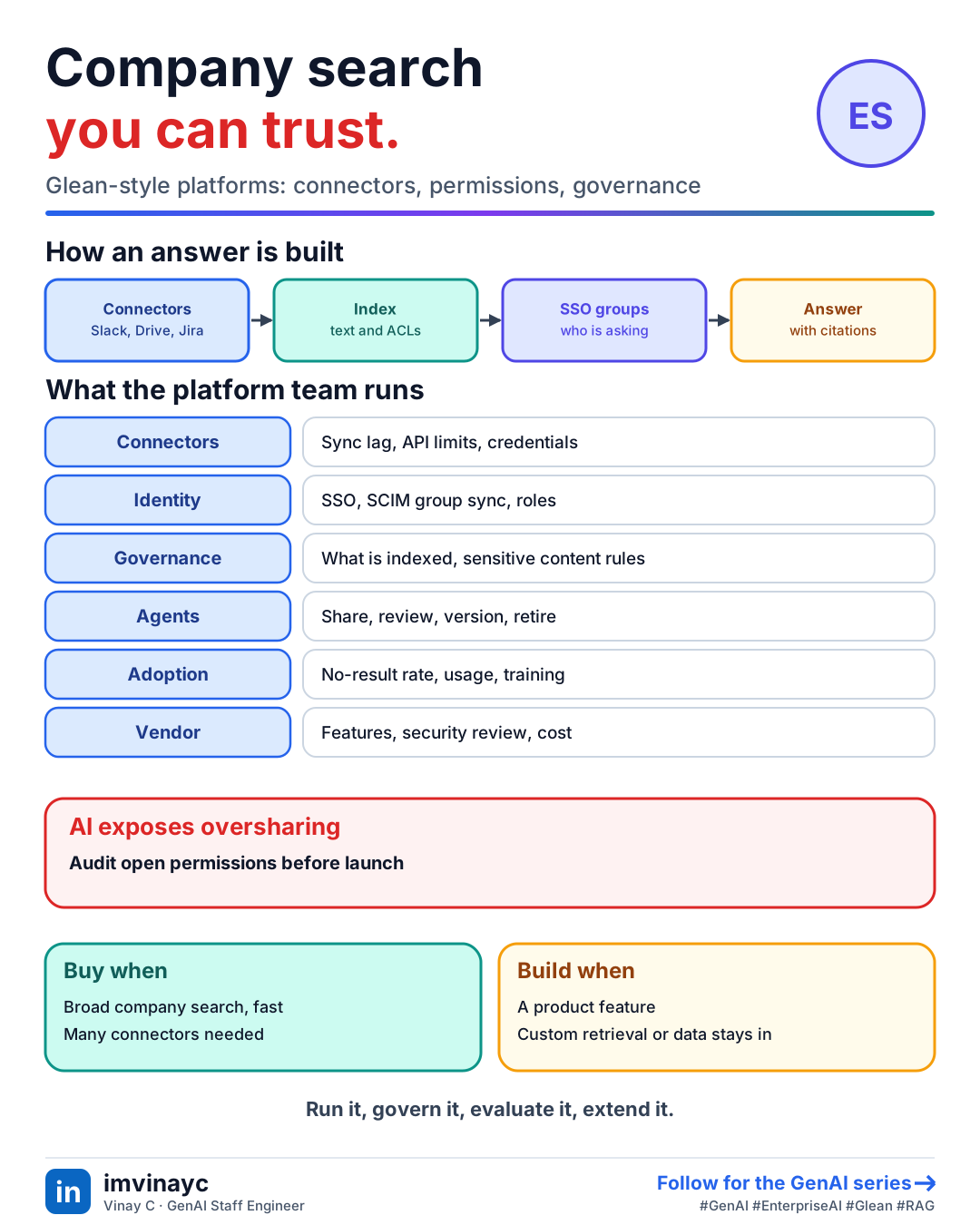
Download imageFree to share, please link back to this lesson.
Platforms such as Glean, Gemini Enterprise and similar tools sell a ready-made version of company-wide RAG: connect your SaaS tools, index everything with its permissions, and offer search, a chat assistant and a no-code agent builder on top. A platform engineer rarely builds retrieval from scratch here. The job is to run, configure, govern and extend it, and to know when to build instead.
What the platform does for you
- Connectors to sources such as Slack, Drive, Confluence, Jira, GitHub and Salesforce, which crawl content, metadata and permissions on a schedule or by events.
- An index with ranking signals beyond text: recency, popularity, who you work with, document type. Often a graph of people, teams and documents.
- An assistant that answers with citations from content the asking user can already see.
- An agent builder for low-code workflows, plus APIs, SDKs or MCP so engineers can extend it.
Permission-aware retrieval is the core idea
The index stores each document's access-control list from its source system. At query time the platform resolves who the user is (through SSO) and which groups they belong to (often synced with SCIM), and returns only content that user may read. AI does not create new access, but it makes badly set permissions easy to discover: a document shared with "everyone" that nobody ever found by browsing now surfaces in a chat answer.
- Permission lag: when access changes in the source, the index may take a while to catch up. Know the sync interval and what the vendor guarantees.
- Oversharing clean-up before a launch: audit sensitive spaces and "anyone with the link" documents.
- Sensitive content: exclude sources or patterns (HR, legal, security) and apply data-loss rules.
What a platform engineer runs
| Area | Typical work |
|---|---|
| Connectors | Onboard sources, monitor sync lag and errors, handle API rate limits and credential rotation |
| Identity | SSO, SCIM group sync, role design for admins, builders and users |
| Governance | Which sources are indexed, sensitive-content rules, data residency, audit logs, retention |
| Agents | Publish and share agents, review before wider release, ownership, versioning, retire unused ones |
| Quality | Query sets and feedback, no-result rate, zero-click searches, fix noisy or stale sources |
| Adoption | Usage analytics, training, office hours, templates, a champions network |
| Vendor | Feature requests, roadmap, support tickets, security reviews, contract and cost |
Extending the platform
- Custom connectors for internal systems the vendor does not cover.
- Actions and tools so agents can do things (create a ticket), with approval for anything that writes.
- Expose it elsewhere: an API or MCP server so other agents and apps can reuse the company search instead of rebuilding retrieval.
- Evaluate it yourself: keep a set of real questions with known answers and run it after every vendor release.
Build or buy
| Buy a platform when | Build your own when |
|---|---|
| The need is broad company search and a general assistant | The use case is a product feature or a narrow domain workflow |
| Many source connectors with permissions are needed quickly | You need custom chunking, ranking or evaluation control |
| You want vendor-maintained security and updates | Data must stay in your own environment |
| Time to value matters most | Per-seat pricing does not fit your usage |
Check yourselfRight after launch, an employee asks the assistant about salaries and gets a spreadsheet summary they should not see. What happened and what do you do?
Almost certainly a permissions problem at the source: the file was shared too widely, and the platform correctly enforced the (wrong) ACL. Fix the source permission, check that the sync has updated the index, audit similar documents, exclude sensitive sources or patterns, and add a pre-launch oversharing review.
Check yourselfUsers say search "cannot find" a page that was updated this morning. Where do you look?
Connector health: sync lag, errors, API rate limits or expired credentials for that source. Then check whether the document type or space is excluded, whether permissions changed, and what the vendor says about indexing delay. Report the gap to the vendor with examples.
Summary: say it in the interview
- "The platform gives me connectors, permission-aware retrieval and an agent builder. I make it trustworthy: clean up permissions, watch sync lag, govern what is indexed, evaluate it on our own questions, and extend it with custom connectors and MCP."