CI/CD with GitHub Actions, including eval gates
We'll cover the following
Visual summary
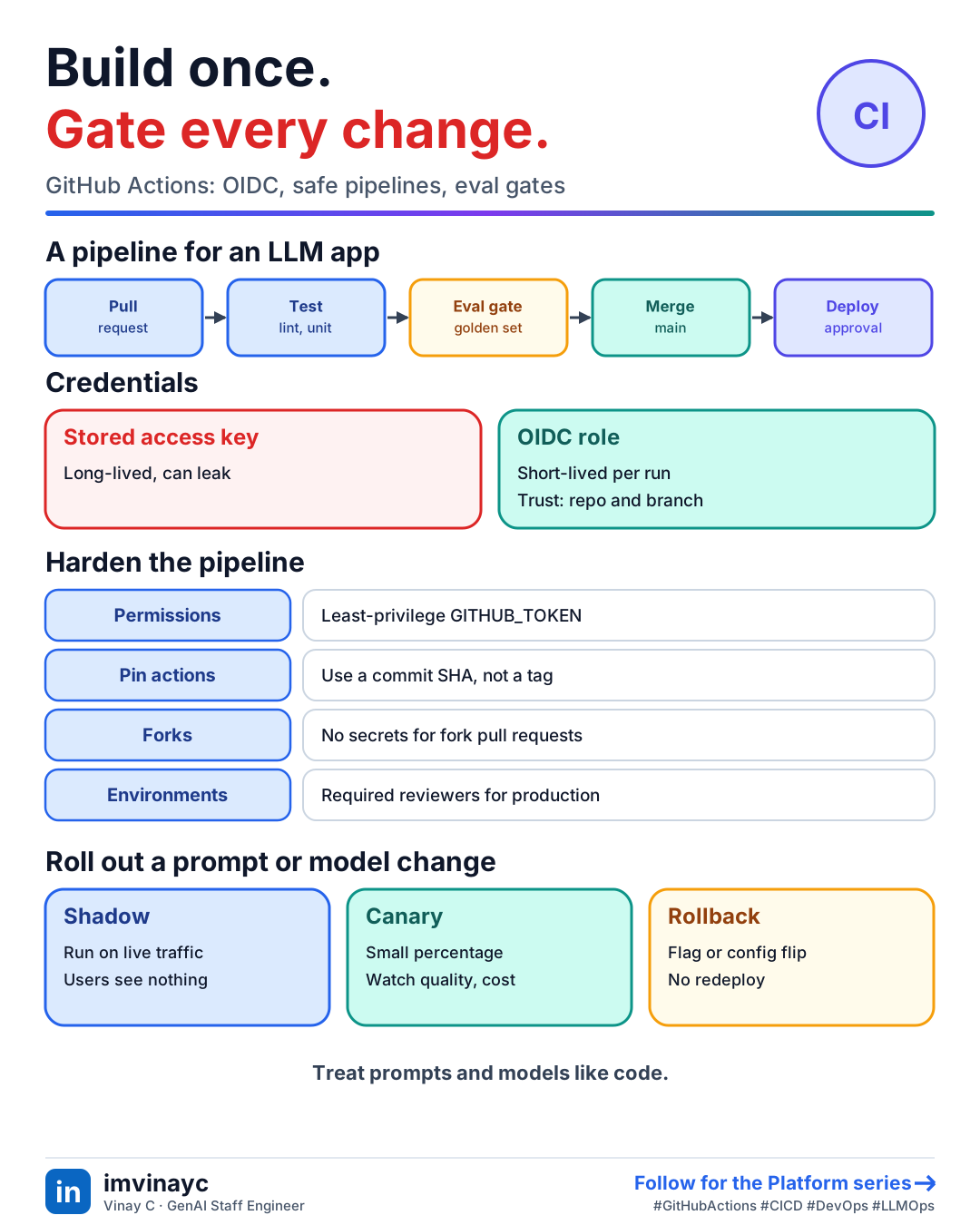
Download imageFree to share, please link back to this lesson.
CI merges and tests small changes often. CD delivers a passing change to an environment automatically or with one approval. GitHub Actions runs both from YAML in .github/workflows/. The concepts map directly onto Jenkins and Azure DevOps: a pipeline has stages or jobs, which run steps on agents or runners.
The vocabulary
| GitHub Actions | Meaning |
|---|---|
| Workflow | One YAML file, started by an event |
| Event | pull_request, push, schedule (cron), workflow_dispatch (manual) |
| Job | A group of steps on one runner. Jobs run in parallel unless you add needs |
| Step | A shell command or a reusable action (uses:) |
| Runner | The machine that executes a job: GitHub-hosted or self-hosted |
| Environment | A named target (staging, production) with secrets and optional required reviewers |
A pipeline for a service
name: ci
on:
  pull_request:
  push:
    branches: [main]

permissions:
  contents: read          # least privilege for GITHUB_TOKEN

concurrency:
  group: ci-${{ github.ref }}
  cancel-in-progress: true

jobs:
  test:
    runs-on: ubuntu-latest
    steps:
      - uses: actions/checkout@v4
      - uses: actions/setup-python@v5
        with: { python-version: "3.12", cache: pip }
      - run: pip install -r requirements.txt
      - run: ruff check . && pytest -q

  deploy:
    needs: test
    if: github.ref == 'refs/heads/main'
    runs-on: ubuntu-latest
    environment: production      # can require a reviewer
    permissions:
      id-token: write            # for OIDC
      contents: read
    steps:
      - uses: actions/checkout@v4
      - uses: aws-actions/configure-aws-credentials@v4
        with:
          role-to-assume: arn:aws:iam::123456789012:role/gha-deploy
          aws-region: us-east-1
      - run: ./scripts/deploy.sh
Credentials: use OIDC, not stored keys
Storing an AWS access key as a secret means a long-lived credential that can leak. With OIDC, the job gets a short-lived token from GitHub and exchanges it for temporary AWS credentials by assuming an IAM role. The role's trust policy names the GitHub OIDC provider and restricts the token's sub claim to your repo and branch or environment, so a fork or another repo cannot assume it.
Making pipelines safe and fast
- Least privilege: set
permissions:explicitly. Default tokens are broader than needed. - Pin third-party actions to a commit SHA, since a tag can be moved by its owner.
- Never run untrusted code with secrets: pull requests from forks must not receive production secrets.
- Cache dependencies, use a build matrix for versions, and set
concurrencyto cancel superseded runs. - Reusable workflows (
workflow_call) keep many repos on one tested pipeline. - Environments with required reviewers gate production. Deploy the same artifact you tested, built once.
CI for LLM applications: the eval gate
Unit tests cannot tell you a prompt edit made answers worse. Add an eval gate: a job that runs your golden dataset through the changed prompt, model or retrieval setting and compares the scores with the baseline from main.
- Trigger on changes to prompts, model config, retrieval settings or agent code (path filters).
- Run a small, fast golden set (tens to low hundreds of cases) with a cheap judge and fixed seeds or temperature 0.
- Compare to the stored baseline. Fail on a drop larger than noise (see the eval statistics lesson), not on any tiny dip.
- Post a table of metric deltas and the worst regressions as a PR comment.
- Run the large, expensive suite nightly or before release, and cap spend per run.
LLM calls are flaky and cost money, so keep deterministic unit tests (parsing, tool schemas, guardrail rules) separate from probabilistic evals, and never let a flaky eval silently block every merge.
Rolling out a model or prompt change
- Version prompts and put the version on every trace.
- Shadow: run the new version on live traffic without showing users, and compare.
- Canary: send a small percentage, watch quality, latency, cost and errors, then widen.
- Fast rollback: a feature flag or config flip, not a redeploy.
Check yourselfWhy prefer OIDC to an AWS access key stored in GitHub secrets?
Keys are long-lived and can leak through logs or a compromised workflow. OIDC issues short-lived credentials per run, and the role's trust policy limits them to your repo, branch or environment, so there is nothing permanent to steal.
Check yourselfA prompt change drops answer quality, but all unit tests pass. How do you catch it before merge?
Add an eval job triggered by prompt changes that runs the golden dataset and compares metrics with the main baseline, failing when the drop exceeds noise, and posting the deltas on the PR. Run the larger suite nightly and canary the change in production.
Summary: say it in the interview
- "Build once, test in CI, deploy through gated environments with OIDC roles, and treat prompt and model changes like code: eval gate on the PR, canary in production, one-step rollback."