If you've called an LLM API once or twice and thought "okay, but how do real apps wire this together?" — this post is for you. We'll start from the absolute basics, build up the core pieces one at a time with runnable examples, and then talk honestly about when LangChain helps and when it gets in your way.
A note before we start: LangChain moves fast. This guide targets the v1.x line (the first stable 1.0 landed in November 2025), which is meaningfully different from the older 0.x tutorials still floating around the internet. If a tutorial tells you to use LLMChain, SequentialChain, or initialize_agent, it's out of date — those are deprecated. We'll use the modern patterns throughout and flag the old ones so you don't get confused.
Part 1: The basics (what problem are we even solving?)
What is an LLM, mechanically?
A large language model (LLM) like those from OpenAI, Anthropic, or Google is, from your code's point of view, just an HTTP endpoint. You send it some text (and settings like temperature), and it streams back generated text. That's it. There's no memory between calls, no built-in access to your files, no ability to run code or search the web. Each request is independent.
Here's roughly what calling a model without any framework looks like (using a provider's own SDK):
python
from openai import OpenAI

client = OpenAI()
response = client.chat.completions.create(
    model="gpt-5.5",  # use whatever current model you have access to
    messages=[{"role": "user", "content": "Explain photosynthesis in one sentence."}],
)
print(response.choices[0].message.content)
This works perfectly well. So why add a framework at all?
Why a framework?
The moment you go beyond a single call, you hit recurring problems:
- You want to swap providers (OpenAI today, Anthropic tomorrow) without rewriting your app.
- You want to feed the model your own documents so it can answer questions about them.
- You want the model to use tools — search, a calculator, your database — and decide when to use them.
- You want conversation memory, streaming, retries, and structured output you can trust.
- You want to chain steps together: take a question → retrieve documents → build a prompt → call the model → parse the result.
You can build all of this by hand. A framework gives you reusable, standardized building blocks so you don't reinvent them every time. LangChain is one such framework — currently the most popular one for this in Python (and there's a JavaScript/TypeScript version too, LangChain.js).
Part 2: What LangChain actually is
LangChain is an open-source framework for building applications and agents powered by LLMs. Its core value proposition is standard, provider-agnostic abstractions: you write your logic against LangChain's interfaces, and you can plug in different model providers, vector databases, and tools underneath without rewriting your application code.
A few things that are true about LangChain in 2026 and worth knowing up front:
- It is not one package. It's an ecosystem of packages (more on this below), which trips up beginners constantly.
- The high-level langchain package is now focused on agents and a small set of essential building blocks, and it's built on top of LangGraph, a lower-level orchestration runtime. You don't need to learn LangGraph for basic usage — it powers reliability features (persistence, streaming, human-in-the-loop) under the hood.
- A lot of older machinery (LLMChain, AgentExecutor, initialize_agent) has been deprecated and moved out into a langchain-classic package. The modern way is simpler.
The package ecosystem (read this — it saves hours of confusion)
When you pip install langchain, you're not getting a monolith. The ecosystem is split into separate packages, each with its own version and release cycle:
PackageWhat it's forlangchain-coreThe foundation: base abstractions and the LangChain Expression Language (LCEL). Knows nothing about any specific provider — it just defines what a chat model, prompt, or parser looks like as an interface.langchainHigh-level building blocks: agents, retrieval helpers, the unified model initializer.langchain-openai, langchain-anthropic, langchain-google-genai, etc.Provider packages. Each one implements the core interfaces for a specific provider. Install the one(s) you need.langgraphThe low-level agent execution runtime. Used directly for advanced, custom agent workflows.langsmithA commercial observability/tracing/evaluation platform (optional, but very useful for debugging).langchain-communityA historical catch-all of community integrations. It is being sunset — prefer dedicated provider packages where they exist.langchain-classicHome for deprecated legacy pieces (old chains, some retrievers) if you still need them.
The key insight: because everything is built on langchain-core's abstractions, you can swap providers by changing one line and leave your application logic untouched. That's the payoff for the extra structure.
Installing
You need Python 3.10 or higher (v1.x dropped 3.9). Install the core package plus a provider package:
bash
pip install -U langchain langchain-openai
# or: pip install -U langchain langchain-anthropic
Then set your provider's API key as an environment variable:
bash
export OPENAI_API_KEY="sk-..."        # macOS/Linux
# setx OPENAI_API_KEY "sk-..."        # Windows
Part 3: The building blocks, one at a time
We'll build up from a single model call to a full agent. Each step adds exactly one new concept.
Building block 1: Chat models
The first abstraction is the chat model. Instead of importing a provider's SDK directly, you use LangChain's unified initializer, init_chat_model. This is the single most useful beginner pattern, because it's how you stay provider-agnostic:
python
from langchain.chat_models import init_chat_model

model = init_chat_model("openai:gpt-5.5", temperature=0)

response = model.invoke("Explain photosynthesis in one sentence.")
print(response.content)
The string "openai:gpt-5.5" is provider:model. To switch to Anthropic or Google, you change only that string (and install the matching package). Your surrounding code stays identical. That portability is the whole point.
Tip: Model names change constantly. Use whatever current model you actually have access to from your provider's docs; the names in this post are just placeholders.
Every chat model supports a consistent set of methods:
- .invoke(...) — one input, one output.
- .stream(...) — yields tokens as they're generated (for responsive UIs).
- .batch([...]) — processes many inputs in parallel.
- Async versions (.ainvoke, etc.) for high-concurrency servers.
You get all of these for free on any component you build, which matters later.
Building block 2: Prompt templates
Hardcoding prompts is fine for demos but not for apps. A prompt template lets you define a reusable prompt with {placeholders} that get filled in at runtime:
python
from langchain_core.prompts import ChatPromptTemplate

prompt = ChatPromptTemplate.from_messages([
    ("system", "You are a concise tutor. Answer in exactly one sentence."),
    ("user", "Explain {topic} to a {audience}."),
])

messages = prompt.invoke({"topic": "photosynthesis", "audience": "five-year-old"})
print(messages)  # a structured list of messages, ready to send to a model
Templates separate the shape of your prompt from the data you fill in — easier to maintain, test, and reuse.
Building block 3: Output parsers and structured output
By default a model returns free-form text. Often you want structured data — a JSON object with specific fields you can rely on. The modern approach uses a Pydantic model to declare the shape you want, then asks the model to conform to it:
python
from pydantic import BaseModel, Field
from langchain.chat_models import init_chat_model

class MovieReview(BaseModel):
    title: str = Field(description="The movie's title")
    rating: int = Field(description="Score from 1 to 10")
    summary: str = Field(description="One-sentence summary")

model = init_chat_model("openai:gpt-5.5")
structured_model = model.with_structured_output(MovieReview)

result = structured_model.invoke("Review the movie Inception.")
print(result.title, result.rating)   # typed Python object, not a string
print(type(result))                  # <class '__main__.MovieReview'>
This is a big deal for real applications: instead of fragile string-parsing, you get back a validated object with the fields you defined.
Building block 4: LCEL — chaining things together with |
Now the signature LangChain idea. LCEL (LangChain Expression Language) lets you compose building blocks into a pipeline using the pipe operator |, the same way you'd pipe commands in a Unix shell. Output of one step flows into the next:
python
from langchain_core.prompts import ChatPromptTemplate
from langchain_core.output_parsers import StrOutputParser
from langchain.chat_models import init_chat_model

prompt = ChatPromptTemplate.from_messages([
    ("system", "You are a concise tutor."),
    ("user", "Explain {topic} in one sentence."),
])
model = init_chat_model("openai:gpt-5.5")
parser = StrOutputParser()   # pulls the plain string out of the model's response

chain = prompt | model | parser

print(chain.invoke({"topic": "photosynthesis"}))
Read prompt | model | parser as: fill the prompt, send it to the model, extract the text.
The whole chain is itself invokable, streamable, and batchable — you didn't write any streaming or batching code, but chain.stream(...) and chain.batch([...]) just work.
That automatic support for streaming, batching, and async across any composed pipeline is the main reason LCEL exists, and it replaces the old LLMChain/SequentialChain classes you'll see in outdated tutorials.
Building block 5: Retrieval (RAG) — letting the model use your data
LLMs only know what was in their training data, and they don't know your private documents. Retrieval-Augmented Generation (RAG) fixes this: you store your documents in a searchable form, fetch the relevant pieces at question time, and stuff them into the prompt. The model then answers grounded in your data.
RAG introduces four new building blocks. Here's the pipeline conceptually:
- Document loaders read your source (PDF, web page, database) into LangChain Document objects.
- Text splitters chunk long documents into smaller pieces (models have context limits, and smaller chunks retrieve more precisely).
- Embeddings turn each chunk into a vector (a list of numbers capturing its meaning).
- Vector stores index those vectors so you can find the chunks most similar to a question.
A minimal end-to-end example:
python
from langchain_community.document_loaders import TextLoader
from langchain_text_splitters import RecursiveCharacterTextSplitter
from langchain_openai import OpenAIEmbeddings
from langchain_core.vectorstores import InMemoryVectorStore
from langchain_core.prompts import ChatPromptTemplate
from langchain_core.output_parsers import StrOutputParser
from langchain.chat_models import init_chat_model

# 1. Load
docs = TextLoader("my_notes.txt").load()

# 2. Split
splitter = RecursiveCharacterTextSplitter(chunk_size=1000, chunk_overlap=150)
chunks = splitter.split_documents(docs)

# 3. Embed + 4. Store (InMemory is fine for learning; use a real DB in production)
vectorstore = InMemoryVectorStore.from_documents(chunks, OpenAIEmbeddings())
retriever = vectorstore.as_retriever(search_kwargs={"k": 4})

# Build the RAG chain
prompt = ChatPromptTemplate.from_messages([
    ("system", "Answer using ONLY the context below. If unsure, say you don't know.\n\nContext:\n{context}"),
    ("user", "{question}"),
])
model = init_chat_model("openai:gpt-5.5")

def format_docs(docs):
    return "\n\n".join(d.page_content for d in docs)

# Wire it together: retrieve, format, fill prompt, call model, parse
rag_chain = (
    {"context": retriever | format_docs, "question": lambda x: x}
    | prompt
    | model
    | StrOutputParser()
)

print(rag_chain.invoke("What did my notes say about the budget meeting?"))
This is the core pattern behind most "chat with your documents" apps. For production you'd swap InMemoryVectorStore for a real vector database (Chroma, Pinecone, pgvector, etc.) — and because of the standard interfaces, that's mostly a one-line change.
Heads-up: Some loaders/utilities still live in langchain-community, which is being sunset. Check the current docs for the recommended package for your specific loader; the dedicated packages are the future-proof choice.
Building block 6: Tools
A tool is just a Python function the model is allowed to call. You expose a function, and the model decides when to invoke it and with what arguments. The @tool decorator turns a function into a tool; its name, docstring, and argument names become part of what the model sees, so write a clear docstring — it's effectively part of the prompt.
python
from langchain.tools import tool

@tool
def get_weather(city: str) -> str:
    """Get the current weather for a given city."""
    # In reality you'd call a weather API here.
    return f"It's 22°C and sunny in {city}."

@tool
def multiply(a: float, b: float) -> float:
    """Multiply two numbers together."""
    return a * b
On their own, tools don't do anything special. They become powerful when handed to an agent.
Building block 7: Agents — letting the model decide what to do
A chain runs a fixed sequence of steps. An agent is different: you give the model a set of tools and a goal, and the model decides, step by step, which tools to call, in what order, looking at each result before deciding the next move. This loop — think, act, observe, repeat — is what makes agents feel "smart."
In v1.x, you build one with create_agent:
python
from langchain.agents import create_agent
from langchain.tools import tool

@tool
def get_weather(city: str) -> str:
    """Get the current weather for a given city."""
    return f"It's 22°C and sunny in {city}."

@tool
def multiply(a: float, b: float) -> float:
    """Multiply two numbers together."""
    return a * b

agent = create_agent(
    model="openai:gpt-5.5",
    tools=[get_weather, multiply],
    system_prompt="You are a helpful assistant. Use tools when they help.",
)

result = agent.invoke({"messages": [{"role": "user", "content": "What's the weather in Tokyo, and what's 23 times 7?"}]})
print(result["messages"][-1].content)
The agent will recognize it needs get_weather for the first part and multiply for the second, call each, and combine the results. This replaces the old AgentExecutor / initialize_agent approach — if you see those in a tutorial, it predates v1.0.
Under the hood, create_agent is built on LangGraph, which is what gives agents durability, streaming, and the ability to pause for human approval — without you having to wire that up manually.
Building block 8: Memory and persistence
By default an agent forgets everything between calls. To make a multi-turn conversation, you attach a checkpointer, which persists state per conversation thread:
python
from langchain.agents import create_agent
from langgraph.checkpoint.memory import InMemorySaver

agent = create_agent(
    model="openai:gpt-5.5",
    tools=[],
    checkpointer=InMemorySaver(),   # remembers state across turns
)

config = {"configurable": {"thread_id": "user-123"}}
agent.invoke({"messages": [{"role": "user", "content": "My name is Sam."}]}, config)
reply = agent.invoke({"messages": [{"role": "user", "content": "What's my name?"}]}, config)
print(reply["messages"][-1].content)  # knows it's "Sam"
The thread_id is how it keeps different users' conversations separate. InMemorySaver is for learning; production uses a database-backed checkpointer so memory survives restarts.
Building block 9: Middleware (a glimpse of "production")
A newer v1.x concept worth knowing the name of, even as a beginner: middleware. It lets you hook into an agent's execution to add cross-cutting behavior — for example, PII-detection middleware that redacts personal data, human-in-the-loop middleware that pauses for approval before a sensitive action, or summarization middleware that compresses long conversation histories automatically. You don't need it on day one, but it's how teams add guardrails without rewriting their agent.
# Example 10: Middleware (logging and counting tool calls)
print("\n=== Example 10: Middleware (logging invocations) ===")

call_count = {"count": 0}

def logging_middleware(func):
    """Wraps a tool to log its calls."""
    def wrapper(*args, **kwargs):
        call_count["count"] += 1
        print(f"  [Tool call #{call_count['count']}] {func.__name__}({args}, {kwargs})")
        result = func(*args, **kwargs)
        print(f"  [Result] {result}")
        return result
    return wrapper

@tool
def add(a: float, b: float) -> float:
    """Add two numbers together."""
    return a + b

@tool
def subtract(a: float, b: float) -> float:
    """Subtract two numbers."""
    return a - b

# Create a simple chain that uses tools with logging
math_agent = create_agent(
    model=model,
    tools=[add, subtract],
    system_prompt="You are a math helper. Use tools for calculations.",
)

# Wrap the agent's invoke to log inputs/outputs
original_invoke = math_agent.invoke

def invoke_with_logging(input_data, config=None):
    print(f"[Input] {input_data.get('messages', [{}])[-1].get('content', '')}")
    result = original_invoke(input_data, config)
    print(f"[Output] {result['messages'][-1].content}")
    return result

math_agent.invoke = invoke_with_logging

result = math_agent.invoke({"messages": [{"role": "user", "content": "What's 100 minus 37?"}]})
print(f"\nFinal answer: {result['messages'][-1].content}")
Part 4: The benefits of using LangChain
Now that you've seen the pieces, here's where LangChain genuinely earns its place:
- Provider portability. Write against the interfaces, swap openai:... for anthropic:..., and your logic is untouched. If you expect to change models (you will), this is real leverage.
- You skip a lot of plumbing. Streaming, batching, async, retries, and structured output come built into composed pipelines. You're not hand-rolling SSE parsing or JSON-repair logic.
- A huge integration catalog. Dozens of model providers, many vector databases, and countless document loaders share the same interfaces, so trying a different one is usually a small change.
- Fast prototyping. You can stand up a working RAG app or tool-using agent in a weekend. For demos, internal tools, and learning, this speed is hard to beat.
- Standard agent architecture. create_agent gives you a sensible, batteries-included agent loop built on a durable runtime, rather than you reinventing the think-act-observe cycle.
- Observability. Paired with LangSmith, you can trace exactly what prompts went to the model and where time was spent — invaluable once your chains get non-trivial.
Part 5: The honest cons (and when not to use it)
LangChain has real, frequently-cited downsides. A good beginner guide tells you about them so you can make an informed choice.
- Heavy dependencies. A fresh install pulls in a large dependency tree (reported around the high-200s of transitive packages in 2026). That's a lot of surface area for version conflicts and security patches in a production service.
- Abstractions can hide what's happening. The convenience that makes prototyping fast can make debugging slow. When a deeply composed chain fails, the stack trace can be many frames deep inside framework internals rather than your code. A common complaint: "I just want to see the exact prompt that was sent to the model."
- Breaking-change cadence. LangChain has gone through several major refactors since 2023 (the core/community split, the LCEL migration, schema rewrites, the v1.0 repackaging). If you don't pin your versions, upgrades can bite. Pin your dependencies (langchain>=1,<2, etc.).
- It can be overkill. For a single model call or a simple, fixed two-step flow, LangChain adds concepts and dependencies you don't need. Sometimes the provider's own SDK is the cleaner choice.
- Python-centric. The JS/TS port generally trails the Python version in features. Non-Python backends sometimes end up running a Python service just for LangChain.
Some teams migrate off LangChain as their agent workloads scale, often toward more focused tools — for example, LlamaIndex when the workload is heavily retrieval-focused, or building directly on a model provider's SDK when they want maximum control and minimal dependencies. That's not a knock on LangChain; it reflects that frameworks have a sweet spot.
Rule of thumb:
- Use LangChain when you're prototyping, need provider flexibility, want RAG/agent building blocks fast, or value the integration ecosystem.
- Consider going without it when you have a simple, stable use case, when you need a minimal dependency footprint, when every millisecond of latency and every line of the prompt must be under your direct control, or when your stack isn't Python-friendly.
Part 6: With vs. without LangChain, side by side
The same task — "answer a question, but return a clean string" — illustrates the trade-off.
Without a framework (provider SDK directly): full control, minimal dependencies, but you write the glue yourself and you're coupled to one provider's response shape.
python
from openai import OpenAI
client = OpenAI()

def answer(topic):
    r = client.chat.completions.create(
        model="gpt-5.5",
        messages=[
            {"role": "system", "content": "Answer in one sentence."},
            {"role": "user", "content": f"Explain {topic}."},
        ],
    )
    return r.choices[0].message.content
With LangChain: more concepts, but provider-agnostic and composable, with streaming/batching for free.
python
from langchain_core.prompts import ChatPromptTemplate
from langchain_core.output_parsers import StrOutputParser
from langchain.chat_models import init_chat_model

prompt = ChatPromptTemplate.from_messages([
    ("system", "Answer in one sentence."),
    ("user", "Explain {topic}."),
])
chain = prompt | init_chat_model("openai:gpt-5.5") | StrOutputParser()
# chain.invoke(...), chain.stream(...), chain.batch([...]) all work
For this tiny task, the raw SDK is arguably simpler. The LangChain version pays off as you add retrieval, tools, memory, multiple providers, and streaming — because each of those is a standard block you snap on, not custom code you maintain.
Part 7: Common beginner pitfalls
- Following outdated tutorials. This is the #1 trap. If you see LLMChain, SequentialChain, initialize_agent, or AgentExecutor, the material predates v1.0. Prefer init_chat_model, LCEL pipelines, and create_agent. When in doubt, check the official docs' date.
- Installing the wrong package. Remember the split: you almost always need langchain plus a provider package like langchain-openai. Importing a provider class without its package installed is a classic first error.
- Not pinning versions. Given the framework's pace, an unpinned pip install can change behavior between deploys. Pin them.
- Reaching for an agent when a chain will do. Agents are non-deterministic and harder to debug. If your steps are fixed, use a chain (LCEL). Only use an agent when the model genuinely needs to decide what to do.
- Skipping observability. Once chains get non-trivial, set up tracing early so you can see what's actually being sent to the model.
Conclusion
LangChain is best understood not as a single magic tool but as a box of standardized building blocks — chat models, prompts, parsers, retrievers, tools, and agents — that snap together through LCEL and run on a durable agent runtime. Its strengths are speed of prototyping, provider portability, and a vast integration ecosystem. Its weaknesses are a heavy dependency footprint, abstractions that can obscure debugging, and a brisk pace of breaking changes.
For learning, prototyping, and a great many production apps, that's an excellent trade. For ultra-simple or ultra-controlled use cases, going closer to the metal can be the better call. Now that you know the building blocks and the trade-offs, you can decide for yourself — which is exactly where a beginner should end up.
Because LangChain evolves quickly, always cross-check specifics — package names, model strings, and recommended APIs — against the official documentation at docs.langchain.com before shipping.
Infographic Summary
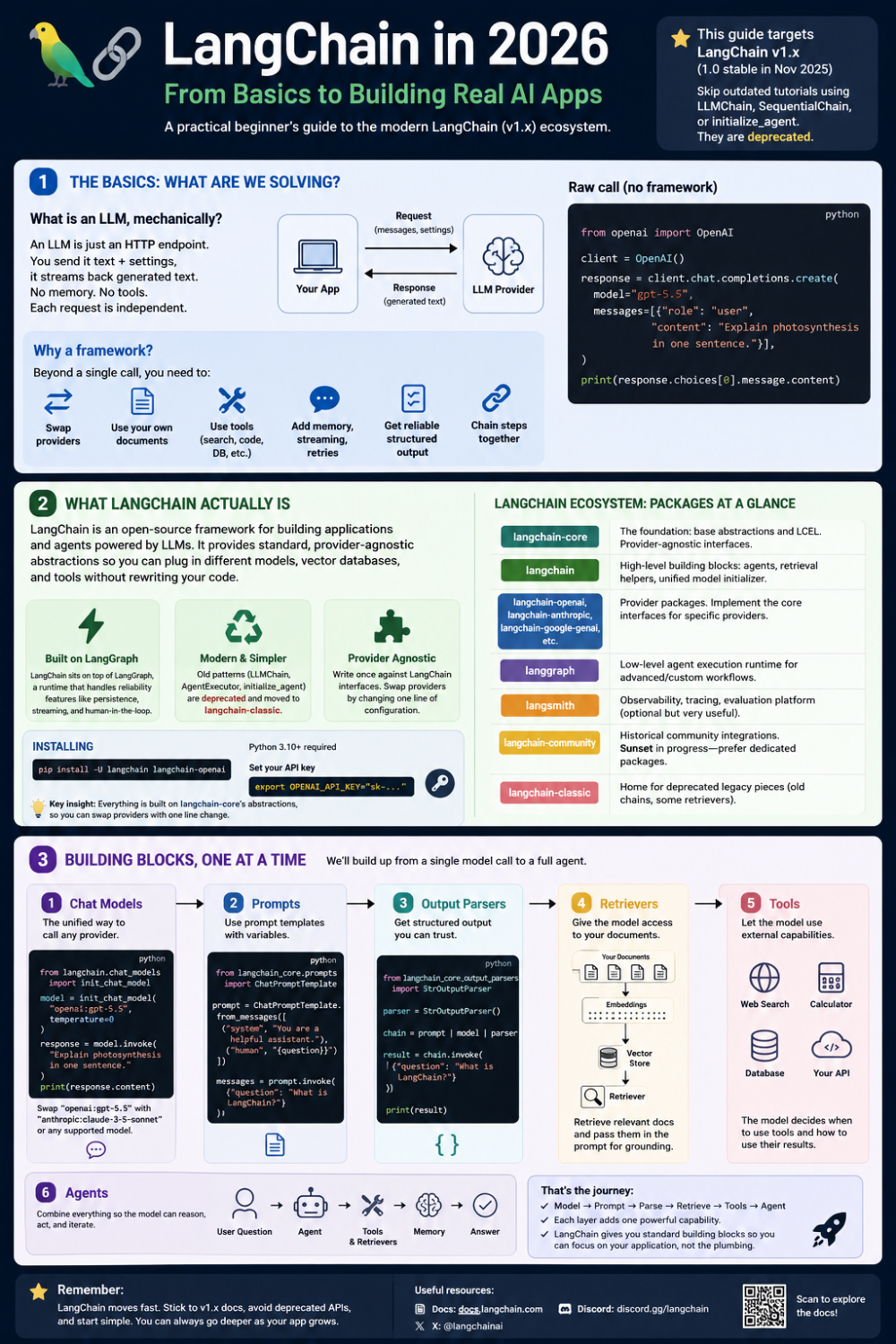
infographic summary of langchain
Full Code - which actually works.
requirements.txt
langchain
langchain-ollama
main.py
"""LangChain examples with local Ollama (gemma4) model."""

from langchain.chat_models import init_chat_model
from langchain_core.prompts import ChatPromptTemplate
from langchain_core.output_parsers import StrOutputParser
from pydantic import BaseModel, Field
from langchain_community.document_loaders import TextLoader
from langchain_text_splitters import RecursiveCharacterTextSplitter
from langchain_ollama import OllamaEmbeddings
from langchain_core.vectorstores import InMemoryVectorStore
from langchain.agents import create_agent
from langchain_core.tools import tool
from langgraph.checkpoint.memory import InMemorySaver
from langchain_core.runnables import RunnableConfig

model = init_chat_model("ollama:gemma4", temperature=0)

# Example 1: Simple invoke
print("=== Example 1: Simple invoke ===")
response = model.invoke("Explain photosynthesis in one sentence.")
print(response.content)

# Example 2: Simple chain with StrOutputParser
print("\n=== Example 2: Prompt + Model + Parser chain ===")
prompt = ChatPromptTemplate.from_messages([
    ("system", "You are a concise tutor."),
    ("user", "Explain {topic} in one sentence."),
])
parser = StrOutputParser()
chain = prompt | model | parser

result = chain.invoke({"topic": "photosynthesis"})
print(result)
print(f"Type: {type(result)}")  # plain str, not a message object

# Example 3: ChatPromptTemplate with multiple variables
print("\n=== Example 3: Prompt template with audience ===")
prompt_multi = ChatPromptTemplate.from_messages([
    ("system", "You are a concise tutor. Answer in exactly one sentence."),
    ("user", "Explain {topic} to a {audience}."),
])

chain_multi = prompt_multi | model | parser

for audience in ["five-year-old", "college student", "PhD chemist"]:
    response = chain_multi.invoke({"topic": "photosynthesis", "audience": audience})
    print(f"\n[{audience}]\n{response}")

# Example 4: Streaming
print("\n=== Example 4: Streaming output ===")
for chunk in chain_multi.stream({"topic": "black holes", "audience": "curious teenager"}):
    print(chunk, end="", flush=True)
print()

# Example 5: Structured output (Pydantic)
print("\n=== Example 5: Structured output ===")


class MovieReview(BaseModel):
    title: str = Field(description="The movie's title")
    rating: int = Field(description="Score from 1 to 10")
    summary: str = Field(description="One-sentence summary")

structured_model = model.with_structured_output(MovieReview)

result = structured_model.invoke("Review the movie Inception.")
print(f"Title: {result.title}")
print(f"Rating: {result.rating}/10")
print(f"Summary: {result.summary}")
print(f"Type: {type(result)}")

# Example 6: Structured output with chain (prompt + model + structured output)
print("\n=== Example 6: Structured output chain ===")

class BookReview(BaseModel):
    title: str = Field(description="The book's title")
    author: str = Field(description="The book's author")
    rating: int = Field(description="Score from 1 to 10")
    recommendation: str = Field(description="One-sentence recommendation")

structured_prompt = ChatPromptTemplate.from_messages([
    ("system", "You are a book critic. Review the given book."),
    ("user", "Review the book: {book}"),
])

structured_chain = structured_prompt | model.with_structured_output(BookReview)

result = structured_chain.invoke({"book": "1984 by George Orwell"})
print(f"Title: {result.title}")
print(f"Author: {result.author}")
print(f"Rating: {result.rating}/10")
print(f"Recommendation: {result.recommendation}")
print(f"Type: {type(result)}")

# Example 7: Retrieval-Augmented Generation (RAG)
print("\n=== Example 7: RAG (Retrieval-Augmented Generation) ===")

# 1. Load document
docs = TextLoader("my_notes.txt").load()

# 2. Split into chunks
splitter = RecursiveCharacterTextSplitter(chunk_size=1000, chunk_overlap=150)
chunks = splitter.split_documents(docs)
print(f"Loaded {len(chunks)} chunks from my_notes.txt")

# 3. Embed + 4. Store (using local Ollama embeddings)
embeddings = OllamaEmbeddings(model="nomic-embed-text")
vectorstore = InMemoryVectorStore.from_documents(chunks, embeddings)
retriever = vectorstore.as_retriever(search_kwargs={"k": 4})

# 5. Build RAG chain
rag_prompt = ChatPromptTemplate.from_messages([
    ("system", "Answer using ONLY the context below. If unsure, say you don't know.\n\nContext:\n{context}"),
    ("user", "{question}"),
])

def format_docs(docs):
    return "\n\n".join(d.page_content for d in docs)

# Wire it: retrieve → format → fill prompt → model → parse
rag_chain = (
    {"context": retriever | format_docs, "question": lambda x: x}
    | rag_prompt
    | model
    | StrOutputParser()
)

# Ask questions
questions = [
    "What did my notes say about the budget meeting?",
    "How much was allocated for infrastructure?",
    "What are the Q3 roadmap focus areas?",
]

for q in questions:
    response = rag_chain.invoke(q)
    print(f"\nQ: {q}")
    print(f"A: {response}")

# Example 8: Agents with tools
print("\n=== Example 8: Agents with tools ===")

@tool
def get_weather(city: str) -> str:
    """Get the current weather for a given city."""
    return f"It's 22°C and sunny in {city}."

@tool
def multiply(a: float, b: float) -> float:
    """Multiply two numbers together."""
    return a * b

agent = create_agent(
    model=model,
    tools=[get_weather, multiply],
    system_prompt="You are a helpful assistant. Use tools when they help.",
)

result = agent.invoke({"messages": [{"role": "user", "content": "What's the weather in Tokyo, and what's 23 times 7?"}]})
print(result["messages"][-1].content)

# Example 9: Agents with memory (conversation history)
print("\n=== Example 9: Agents with memory (conversation state) ===")

agent_with_memory = create_agent(
    model=model,
    tools=[],
    checkpointer=InMemorySaver(),
    system_prompt="You are a helpful assistant that remembers the user.",
)

config = {"configurable": {"thread_id": "user-123"}}

# First turn: tell agent your name
agent_with_memory.invoke({"messages": [{"role": "user", "content": "My name is Sam."}]}, config)

# Second turn: ask agent your name (it should remember)
reply = agent_with_memory.invoke({"messages": [{"role": "user", "content": "What's my name?"}]}, config)
print(reply["messages"][-1].content)

# Example 10: Middleware (logging and counting tool calls)
print("\n=== Example 10: Middleware (logging invocations) ===")

call_count = {"count": 0}

def logging_middleware(func):
    """Wraps a tool to log its calls."""
    def wrapper(*args, **kwargs):
        call_count["count"] += 1
        print(f"  [Tool call #{call_count['count']}] {func.__name__}({args}, {kwargs})")
        result = func(*args, **kwargs)
        print(f"  [Result] {result}")
        return result
    return wrapper

@tool
def add(a: float, b: float) -> float:
    """Add two numbers together."""
    return a + b

@tool
def subtract(a: float, b: float) -> float:
    """Subtract two numbers."""
    return a - b

# Create a simple chain that uses tools with logging
math_agent = create_agent(
    model=model,
    tools=[add, subtract],
    system_prompt="You are a math helper. Use tools for calculations.",
)

# Wrap the agent's invoke to log inputs/outputs
original_invoke = math_agent.invoke

def invoke_with_logging(input_data, config=None):
    print(f"[Input] {input_data.get('messages', [{}])[-1].get('content', '')}")
    result = original_invoke(input_data, config)
    print(f"[Output] {result['messages'][-1].content}")
    return result

math_agent.invoke = invoke_with_logging

result = math_agent.invoke({"messages": [{"role": "user", "content": "What's 100 minus 37?"}]})
print(f"\nFinal answer: {result['messages'][-1].content}")
my_notes.txt
Meeting Notes - Q2 Budget Review
Date: June 20, 2026
Attendees: Finance team, Product leads, Engineering

Budget Meeting Summary:
The Q2 budget meeting discussed allocation of $500K across three main areas:
1. Infrastructure upgrades: $200K for cloud optimization and database scaling
2. Team expansion: $200K for hiring two new engineers and a product manager
3. Marketing initiatives: $100K for product launch campaign

Key decisions:
- Infrastructure upgrades were approved with priority on database performance
- Team expansion was approved, with hiring to begin in July
- Marketing budget was reduced from initial $150K request to $100K due to timing

Next Steps:
- Finance will send detailed breakdown by June 25
- HR to post job descriptions by June 28
- Marketing team to finalize campaign strategy by July 1

The meeting concluded with agreement that we need to monitor spending closely given market conditions. A follow-up review is scheduled for July 15.

---

Engineering Roadmap Q3:
Focus areas for Q3:
- API performance improvements (estimated 4 weeks)
- Mobile app redesign (estimated 6 weeks)
- Security audit and hardening (estimated 3 weeks)

All three initiatives are critical for our Q3 goals. The team consensus is to start API work first, as it blocks mobile performance testing.

---

Product Strategy Notes:
Our target market is growing 15% YoY. Current product-market fit is strong in the enterprise segment but weak in SMB.

Key insight from customer interviews: SMB buyers need simpler pricing and onboarding.
We should prioritize SMB experience improvements in Q3 to capture this market segment.

Customer retention rate is at 92%, up from 88% last quarter.
Originally published on LinkedIn.