If you read my LangChain for Beginners post, you've already wired up a chat model, built an LCEL chain, done basic RAG, and stood up your first create_agent. You know the building blocks. This post is about the next layer: the patterns you reach for when you stop demoing and start building something a teammate (or production) will actually depend on.
Quick summary as infographic
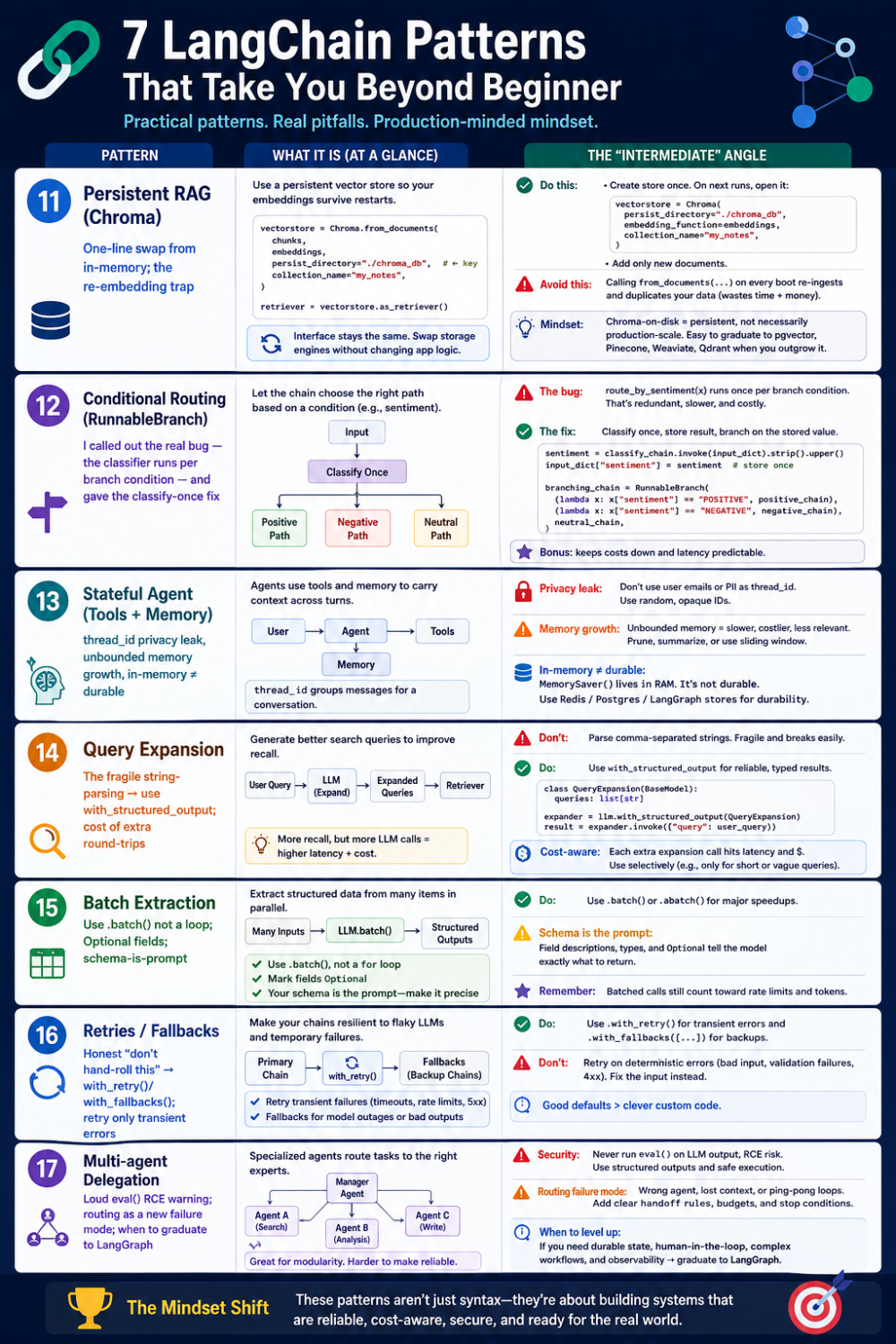
langchain for intermediates - infographic
Let's get started.
Pattern 1: RAG that survives a restart (persistent vector stores)
In the beginner guide we used InMemoryVectorStore. It's perfect for learning — and useless the moment your process exits, because your embeddings vanish with it. Every restart means re-loading, re-chunking, and re-embedding every document. For a handful of notes that's a second; for thousands of PDFs it's minutes of wasted compute (and, on a paid embedding API, real money) on every single boot.
The intermediate move is a persistent vector store. The interface is nearly identical to the in-memory one — that's the whole point of LangChain's abstractions — but the vectors live on disk and survive restarts.
from langchain_chroma import Chroma

# Load and chunk documents
docs = TextLoader("my_notes.txt").load()
splitter = RecursiveCharacterTextSplitter(chunk_size=500, chunk_overlap=100)
chunks = splitter.split_documents(docs)

# Create persistent Chroma store (stored locally on disk)
embeddings = OllamaEmbeddings(model="nomic-embed-text")
vectorstore_chroma = Chroma.from_documents(
    chunks,
    embeddings,
    persist_directory="./chroma_db",      # <-- the key difference
    collection_name="my_notes",
)
retriever_chroma = vectorstore_chroma.as_retriever(search_kwargs={"k": 3})

rag_prompt = ChatPromptTemplate.from_messages([
    ("system", "You are a helpful assistant. Answer questions based on the context provided. Be concise.\n\nContext:\n{context}"),
    ("user", "{question}"),
])

rag_chain_chroma = (
    {"context": retriever_chroma | format_docs, "question": lambda x: x}
    | rag_prompt
    | model
    | StrOutputParser()
)

print(rag_chain_chroma.invoke("What did my notes say about the budget meeting?"))
The only meaningful change from the in-memory version is persist_directory="./chroma_db". Chroma writes the index there; on the next run you can connect to the existing collection instead of re-embedding. Because as_retriever() returns the same interface regardless of backend, the chain downstream is byte-for-byte identical. That's the payoff for living inside the abstraction — you swapped the storage engine without touching your application logic.
Two things intermediates get wrong here:
• Re-embedding when you shouldn't. Chroma.from_documents(...) re-ingests every time you call it. In a real app you create the store once, then on subsequent runs open the existing one (Chroma(persist_directory=..., embedding_function=...)) and only add new documents. Calling from_documents on every boot quietly duplicates your data.
• Treating Chroma as the finish line. Chroma-on-disk is great for a single-node app or a prototype that needs to persist. It is not a distributed, horizontally-scaled vector database. When you outgrow it, the same one-line swap takes you to pgvector, Pinecone, Weaviate, or Qdrant — again, because the retriever interface is standard.
Honest take: persistence is the single highest-leverage upgrade from a beginner RAG demo to something usable, and it costs almost nothing in code. Just know that "persistent" and "production-scale" are two different bars, and Chroma comfortably clears the first, not always the second.
Pattern 2: Conditional routing (let the chain choose its own path)
A plain LCEL chain is a straight line: input flows through a fixed sequence of steps. But real applications branch. A support bot should answer an angry customer differently from a delighted one. A triage system routes a billing question to a different prompt than a technical one.
RunnableBranch is LCEL's if/elif/else. You give it a list of (condition, runnable) pairs plus a default, and it runs the first branch whose condition is true.
from langchain_core.runnables import RunnableBranch

# A small classifier chain decides the sentiment
sentiment_classifier_prompt = ChatPromptTemplate.from_messages([
    ("system", "Classify the sentiment as POSITIVE, NEGATIVE, or NEUTRAL. Reply with only one word."),
    ("user", "{text}"),
])
classify_chain = sentiment_classifier_prompt | model | StrOutputParser()

def route_by_sentiment(input_dict):
    text = input_dict.get("text", "")
    return classify_chain.invoke({"text": text}).strip().upper()

# Three different response strategies
positive_response_prompt = ChatPromptTemplate.from_messages([
    ("system", "The user is happy. Respond warmly and enthusiastically."),
    ("user", "{text}"),
])
negative_response_prompt = ChatPromptTemplate.from_messages([
    ("system", "The user seems unhappy. Respond with empathy and offer to help."),
    ("user", "{text}"),
])
neutral_response_prompt = ChatPromptTemplate.from_messages([
    ("system", "Respond helpfully and neutrally."),
    ("user", "{text}"),
])

branching_chain = RunnableBranch(
    (lambda x: "POSITIVE" in route_by_sentiment(x), positive_response_prompt | model | StrOutputParser()),
    (lambda x: "NEGATIVE" in route_by_sentiment(x), negative_response_prompt | model | StrOutputParser()),
    neutral_response_prompt | model | StrOutputParser(),   # default
)

for text in ["I'm so excited about the launch!", "I'm really frustrated with the slow performance.", "Tell me about the new features."]:
    print(branching_chain.invoke({"text": text}))
This works, and it's a genuinely useful pattern. But I'm going to be honest about a real flaw in this specific implementation, because spotting it is exactly what separates intermediate from beginner:
The classifier runs once per branch condition. Look closely: route_by_sentiment(x) is called inside each lambda. So a NEGATIVE input calls the LLM classifier once for the POSITIVE check (fails), then again for the NEGATIVE check (matches). That's two extra model calls — latency and cost you didn't intend. The fix is to classify once, upstream, and pass the result down:
# Classify once, stash the label, then branch on the stashed value
from langchain_core.runnables import RunnablePassthrough

prepared = RunnablePassthrough.assign(
    sentiment=lambda x: classify_chain.invoke({"text": x["text"]}).strip().upper()
)
branching_chain = prepared | RunnableBranch(
    (lambda x: "POSITIVE" in x["sentiment"], positive_response_prompt | model | StrOutputParser()),
    (lambda x: "NEGATIVE" in x["sentiment"], negative_response_prompt | model | StrOutputParser()),
    neutral_response_prompt | model | StrOutputParser(),
)
Now the classifier runs exactly once and the branches read a cached label. Same behavior, a third of the LLM calls.
Honest take: RunnableBranch is the right tool when your routing logic is genuinely fixed — you know the categories ahead of time and the branches are deterministic. If the routing itself needs reasoning over tool results, you've outgrown a branch and want an agent (Pattern 7). And watch for the "classify-per-condition" trap above — it's an easy way to triple your bill without noticing.
Pattern 3: Multi-turn stateful agents (tools + memory together)
The beginner's guide showed memory (a checkpointer) and tools separately. The intermediate version combines them: an agent that remembers the conversation and can call tools to ground its answers. This is the shape of most real assistants.
@tool
def search_knowledge_base(query: str) -> str:
    """Search internal knowledge base for information."""
    kb = {
        "langchain": "LangChain is a framework for building LLM applications.",
        "agents": "Agents use tools to solve problems step-by-step.",
        "rag": "RAG retrieves context from documents to ground LLM responses.",
    }
    for key, value in kb.items():
        if key.lower() in query.lower():
            return value
    return "Information not found in knowledge base."

@tool
def get_user_context() -> str:
    """Get context about the current user."""
    return "User is learning LangChain for the first time."

multi_turn_agent = create_agent(
    model=model,
    tools=[search_knowledge_base, get_user_context],
    checkpointer=InMemorySaver(),       # <-- memory
    system_prompt="You are a helpful learning assistant. Use tools to provide accurate "
                  "information and personalize responses based on user context.",
)

config = {"configurable": {"thread_id": "learner-1"}}

for i, user_message in enumerate(["What is LangChain?", "Can you explain agents?", "How is RAG different from regular LLMs?"], 1):
    reply = multi_turn_agent.invoke({"messages": [{"role": "user", "content": user_message}]}, config)
    print(f"Turn {i} — {user_message}\n{reply['messages'][-1].content}\n")
The agent now does two things at once: across the three turns it retains conversational state (thanks to the checkpointer and the stable thread_id), and within each turn it can decide to call search_knowledge_base or get_user_context. By the third question it has both the running context of the chat and the ability to look facts up.
What's worth internalizing here:
• The thread_id is your conversation key. Different users = different thread_ids. Reuse one across users and you'll leak one person's history into another's session — a real privacy bug, not a hypothetical one.
• Memory grows, and grows unbounded. Every turn appends to the stored message list. Left alone, a long conversation will eventually blow past your model's context window and your token budget. Production systems add summarization or trimming (a job for middleware, mentioned in the beginner guide) to keep history bounded.
• InMemorySaver is still in-memory. The conversation survives across turns within a process, but not across restarts. Swap it for a database-backed checkpointer (SQLite, Postgres) when memory needs to outlive the process — same interface, durable storage.
Honest take: this is the moment LangChain's agent runtime genuinely earns its keep. Hand-rolling "remember the conversation, decide when to call a tool, feed the result back, loop until done" is a surprising amount of fiddly state machinery. create_agent + a checkpointer gives it to you for free. The cost is that the loop is somewhat opaque — when an agent does something weird, you'll want tracing (LangSmith) to see the actual tool calls and prompts.
Pattern 4: Query expansion (make RAG retrieve what it's actually missing)
Vanilla RAG has a quiet failure mode: it only retrieves documents similar to the exact phrasing of the question. Ask "What's the budget for infrastructure?" and if your notes say "cloud spend allocation," the embeddings might not connect them. The relevant chunk exists; your query just didn't reach for it.
Query expansion fixes this by using the LLM to generate alternative phrasings, then retrieving with all of them and merging the results. You cast a wider net.
query_expansion_prompt = ChatPromptTemplate.from_messages([
    ("system", "You are a query expansion assistant. Given a user query, generate 3 alternative "
               "phrasings that might retrieve better documents. List them as:\n"
               "1. [alternative 1]\n2. [alternative 2]\n3. [alternative 3]"),
    ("user", "{original_query}"),
])
expansion_chain = query_expansion_prompt | model | StrOutputParser()

original_query = "What's the budget for infrastructure?"
expanded_queries = expansion_chain.invoke({"original_query": original_query})

# Parse the numbered list back into individual queries
query_list = [original_query]
for line in expanded_queries.split("\n"):
    if line.strip() and line[0].isdigit() and "." in line:
        query_list.append(line.split(".", 1)[1].strip())

# Retrieve with every variation, then deduplicate
all_results = []
for q in query_list:
    all_results.extend(retriever_simple.invoke(q))

unique_results = {doc.page_content: doc for doc in all_results}.values()
print(f"Total unique chunks retrieved: {len(unique_results)}")
The dedup line is the clever bit: keying a dict by doc.page_content collapses duplicates that several phrasings retrieved in common, so you don't stuff the same chunk into your prompt three times.
The honest trade-offs — and there are real ones:
• You're parsing free-form text with string surgery. That line[0].isdigit() and "." in line parser is fragile. If the model wraps its list in a sentence ("Sure! Here are three:") or uses dashes instead of numbers, the parser silently drops queries. The robust version asks for the variations via with_structured_output (a Pydantic list[str]) instead of regex-ing a numbered list. Reach for structure whenever you're tempted to parse LLM prose.
• You added an LLM round-trip and N retrievals per question. Expansion isn't free — it's a latency and cost tax on every query. It pays off when retrieval quality is your bottleneck; it's pure overhead when your documents already match user phrasing.
• More chunks isn't strictly better. Casting a wider net can also pull in marginally-relevant context that dilutes the prompt. Pair expansion with a reranking or top-k cap so you keep the best of the wider net, not all of it.
Honest take: query expansion is one of the highest-ROI RAG upgrades when your retrieval is genuinely missing relevant docs — but it's a hammer some people swing at every RAG pipeline by default. Measure your retrieval hit-rate first. If it's already good, skip this and save the round-trip.
Pattern 5: Batch structured extraction (a real ETL pattern)
The beginner's guide showed structured output on a single input. The intermediate version is the workhorse use case: running the same extraction over many inputs to turn messy text into clean, validated records — the classic "unstructured to structured" ETL job that LLMs are genuinely great at.
class PersonInfo(BaseModel):
    name: str = Field(description="Person's full name")
    age: int = Field(description="Person's age")
    occupation: str = Field(description="Person's job title")
    interests: list[str] = Field(description="List of hobbies/interests")

extraction_prompt = ChatPromptTemplate.from_messages([
    ("system", "Extract structured information from the text."),
    ("user", "{text}"),
])
extraction_chain = extraction_prompt | model.with_structured_output(PersonInfo)

texts = [
    "John is 28 years old and works as a software engineer. He loves hiking, reading, and cooking.",
    "Sarah, 35, is a product manager who enjoys yoga, traveling, and painting.",
]

for text in texts:
    info = extraction_chain.invoke({"text": text})
    print(f"{info.name}, {info.age} — {info.occupation} — {', '.join(info.interests)}")
Note the list[str] field — structured output handles nested and collection types, not just flat scalars. You get back a validated PersonInfo object every time, so the downstream code (writing to a database, building a dataframe) can trust the shape.
Where intermediates should level up:
• Use .batch(), not a for loop. The example loops for readability, but extraction_chain.batch([{"text": t} for t in texts]) processes inputs concurrently — a big throughput win when you're extracting over hundreds of records. You wrote zero concurrency code; LCEL gave it to you.
• Decide what happens when extraction fails. What if a text has no age? The model might hallucinate one to satisfy the int field, or raise a validation error. For production, make fields Optional where the data genuinely might be missing, and wrap the call so one bad record doesn't kill the whole batch (with_retry() or with_fallbacks() — see the next pattern).
• The schema IS your prompt. Those Field(description=...) strings are sent to the model. Vague descriptions produce vague extractions. Treat them as carefully as you'd treat the system prompt.
Here's the same extraction with all three lessons applied — Optional fields for genuinely-missing data, with_retry() so a transient blip doesn't kill a record, and .batch() with return_exceptions=True so one bad input doesn't abort the whole job:
from typing import Optional

class PersonInfo(BaseModel):
    name: str = Field(description="Person's full name")
    age: Optional[int] = Field(default=None, description="Person's age, or null if not stated")
    occupation: Optional[str] = Field(default=None, description="Job title, or null if not stated")
    interests: list[str] = Field(default_factory=list, description="Hobbies/interests; empty if none")

extraction_prompt = ChatPromptTemplate.from_messages([
    ("system", "Extract structured information from the text. "
               "If a field is not present, leave it null rather than guessing."),
    ("user", "{text}"),
])

# Make the chain resilient: retry transient failures with backoff
extraction_chain = (
    extraction_prompt
    | model.with_structured_output(PersonInfo)
).with_retry(stop_after_attempt=3, wait_exponential_jitter=True)

texts = [
    "John is 28 years old and works as a software engineer. He loves hiking, reading, and cooking.",
    "Sarah, 35, is a product manager who enjoys yoga, traveling, and painting.",
    "Met someone named Alex at the conference — didn't catch much else.",  # sparse on purpose
]

# Process the whole batch concurrently; isolate per-record failures
results = extraction_chain.batch(
    [{"text": t} for t in texts],
    return_exceptions=True,          # a failed record comes back as an Exception, not a crash
)

clean, failed = [], []
for text, result in zip(texts, results):
    if isinstance(result, Exception):
        failed.append((text, result))
        continue
    clean.append(result)
    print(f"{result.name} | age={result.age} | {result.occupation} | {result.interests}")

print(f"\nExtracted {len(clean)} records, {len(failed)} failed.")
The third input is deliberately sparse — with Optional fields and an instruction to leave gaps null, the model returns name="Alex" and None for the rest instead of inventing an age. The return_exceptions=True flag turns a poison record into a logged failure you can inspect later, rather than a stack trace that throws away the 999 records that did parse. That combination — tolerant schema, automatic retry, isolated failures — is the difference between an extraction demo and an extraction job.
Honest take: this is one of the most reliably valuable, least flashy things you can do with an LLM, and LangChain's with_structured_output + .batch() makes it almost boringly easy. If I had to name the single pattern most likely to deliver real business value with the least risk, it's this one.
Pattern 6: Resilience beyond retries (fallbacks, and knowing what to retry)
Pattern 5 already put .with_retry() to work — so you've seen that a single chain can recover from a transient blip on its own. This pattern is about the resilience decisions retries don't answer: what to do when retrying won't help, and whether to retry at all.
Two facts make this an intermediate-level judgment call, not a reflex:
First — retrying the same call only helps for transient failures. A 429 rate-limit or a dropped connection will likely succeed on attempt two. But a 400 "your prompt is malformed," an auth error, or a context-window overflow will fail identically every time — so .with_retry() just burns three calls (and three backoff sleeps) to arrive at the same error, slower and more expensively. Scope your retries to the errors that are actually worth retrying:
# Retry ONLY transient errors — not every exception
from openai import RateLimitError, APITimeoutError   # provider-specific error types

robust_chain = extraction_chain.with_retry(
    retry_if_exception_type=(RateLimitError, APITimeoutError),
    stop_after_attempt=3,
    wait_exponential_jitter=True,   # ~1s, ~2s, ~4s + jitter between tries
)
A note worth knowing: wait_exponential_jitter=True makes .with_retry() genuinely SLEEP between attempts (it's tenacity under the hood) — real time.sleep() on the sync path, asyncio.sleep() on the async path. So three attempts can mean several seconds of waiting before a final failure. That's correct behavior, but it's a latency cost to budget for, not a free safety net.
Second — when retrying can't help, you want a different plan, not the same one again. That's what with_fallbacks() is for: degrade gracefully to an alternative instead of just erroring out.
# Try the primary; if it fails, fall back to a more reliable alternative
fast_model = init_chat_model("ollama:gemma4", temperature=0)
backup_model = init_chat_model("ollama:llama3", temperature=0)

resilient_chain = (
    (extraction_prompt | fast_model.with_structured_output(PersonInfo))
    .with_fallbacks([
        extraction_prompt | backup_model.with_structured_output(PersonInfo)
    ])
)
Now if the fast model chokes on a record — say it can't produce valid structured output — the request silently re-runs against the backup instead of failing. Common real-world uses: a cheap-fast model falling back to a slower-reliable one, a primary provider falling back to a secondary when one has an outage, or a complex prompt falling back to a simpler one.
The two compose — and the nesting order is the thing to get right. The shape you almost always want is retry inside, fall back outside: each option rides out its own transient blips before you give up on it.
# Retry the primary up to 3x; only after those are exhausted, fall back —
# and the backup gets its own retries too.
resilient_chain = (
    (extraction_prompt | fast_model.with_structured_output(PersonInfo))
    .with_retry(stop_after_attempt=3, wait_exponential_jitter=True)
    .with_fallbacks([
        (extraction_prompt | backup_model.with_structured_output(PersonInfo))
        .with_retry(stop_after_attempt=3, wait_exponential_jitter=True)
    ])
)
Read it outside-in: the fallback wrapper calls the primary, the primary retries itself on transient errors, and only when all its attempts are spent does control fall through to the backup. Flip the order — chain.with_fallbacks([...]).with_retry(...) — and you get something different and usually wrong: one "attempt" becomes the whole primary-then-backup pair, so a failed backup re-runs the primary from scratch. Retry-inside-fallback-outside is the default; reach for the other only if you have a specific reason.
And sometimes you still write the loop yourself. Both helpers only apply to LangChain runnables. When you're wrapping a non-LangChain call — a raw third-party API, a database write, a legacy SDK — a small explicit retry loop is exactly right:
import time

def invoke_with_retry(func, *args, max_retries=3, base_delay=0.5):
    for attempt in range(max_retries):
        try:
            return func(*args)
        except (ConnectionError, TimeoutError) as e:   # transient only
            if attempt == max_retries - 1:
                raise
            time.sleep(base_delay * (2 ** attempt))     # exponential backoff
Note this loop catches specific transient exceptions and backs off exponentially — not the bare except Exception with a fixed delay that beginners reach for. Catching everything hides the malformed-input bugs you actually want to see fail fast.
Honest take: resilience is the least glamorous and most production-defining work here. The intermediate lesson isn't "add retries" — Pattern 5 showed that's one line. It's judgment: retry only transient errors, reach for with_fallbacks() when a retry can't help, budget for the real seconds that backoff costs, and save hand-written loops for the glue code LangChain doesn't reach.
Pattern 7: Multi-agent delegation (a router and its specialists)
The capstone. Instead of one agent juggling every tool, you build specialist agents — each focused, each with a small toolset and a tight system prompt — and a router that classifies the incoming request and delegates to the right specialist.
@tool
def calculate(expression: str) -> str:
    """Evaluate a mathematical expression."""
    try:
        return str(eval(expression))
    except Exception:
        return "Invalid expression"

@tool
def translate(text: str, target_language: str) -> str:
    """Translate text to another language (mock)."""
    return f"[{target_language}] {text}"

math_specialist = create_agent(
    model=model, tools=[calculate],
    system_prompt="You are a math specialist. Help with mathematical problems.",
)
translator_specialist = create_agent(
    model=model, tools=[translate],
    system_prompt="You are a translation specialist. Help translate text.",
)

# Router classifies, then delegates
router_prompt = ChatPromptTemplate.from_messages([
    ("system", "You are a router. Classify the request as 'MATH' or 'TRANSLATION' or 'OTHER'."),
    ("user", "{query}"),
])
router_chain = router_prompt | model | StrOutputParser()

for query in ["What's 234 * 456?", "Translate 'Hello World' to Spanish"]:
    classification = router_chain.invoke({"query": query}).strip().upper()
    if "MATH" in classification:
        result = math_specialist.invoke({"messages": [{"role": "user", "content": query}]})
        print(f"Math Agent: {result['messages'][-1].content}")
    elif "TRANSLATION" in classification:
        result = translator_specialist.invoke({"messages": [{"role": "user", "content": query}]})
        print(f"Translation Agent: {result['messages'][-1].content}")
    else:
        print("Other: No specialized agent assigned")
Why split agents instead of giving one agent all the tools? Focus. An agent with three tools picks the right one more reliably than an agent with thirty. Specialists are easier to test, easier to prompt, and easier to reason about. This "router + specialists" shape (sometimes called supervisor/orchestrator) is one of the most common production multi-agent architectures, and it scales: add a new capability by adding a specialist and a route, without touching the others.
The honest warnings — this pattern bites harder than the others:
• eval() is a loaded gun. That calculate tool runs eval() on model-generated input. In a demo it's fine; in anything internet-facing it's a remote-code-execution hole — a malicious query could make the model emit import('os').system(...). Use a safe math parser (ast.literal_eval, numexpr, or sympy) for real arithmetic. I'm leaving the eval() in the example only to flag it loudly: never ship this. (The runnable code uses a safe AST-based parser instead.)
• Routing failure is now a failure mode. If the router misclassifies, the whole request goes to the wrong specialist. You've added a point of failure that single-agent designs don't have. Log classifications, and consider a confidence threshold or a fallback path for OTHER.
• Latency and cost stack up. Every request now pays for a router call plus a specialist call (which itself may loop through tools). Multi-agent systems multiply the LLM calls — make sure the modularity is worth the extra round-trips.
• For real multi-agent work, look at LangGraph directly. This hand-rolled router is great for learning the concept. Once agents need to hand work back and forth, share state, or run in parallel, you'll want LangGraph's graph primitives rather than an if/elif over classification strings. The official langgraph-supervisor / langgraph-swarm helpers exist for exactly this.
Honest take: multi-agent is genuinely powerful and genuinely over-applied. A lot of "multi-agent systems" would be simpler, cheaper, and more reliable as one well-prompted agent with good tools, or even a RunnableBranch (Pattern 2). Reach for multiple agents when the capabilities are truly distinct and you benefit from isolating them — not because multi-agent sounds impressive in an architecture review.
Conclusion
The beginner's guide was about the building blocks. This one is about judgment — the same blocks, composed into patterns, with a clear-eyed view of what each one costs. Persistent RAG, conditional routing, stateful tool-using agents, query expansion, batch extraction, resilient retries, and multi-agent delegation are the seven you'll reach for most as you move from "it works on my machine" to "a teammate depends on this."
LangChain makes every one of these patterns reachable in a few lines — that's the real win. The flip side is that the easy default is almost never the production one, and the framework won't stop you from shipping the demo-grade version. So treat the convenience as a starting point, swap the in-memory pieces for durable ones, add observability early, and — above all — keep asking whether the fancy pattern is the one the problem actually needs.
Next up in this series: the production layer — observability, evaluation, guardrails, and deploying agents you can actually trust.
As always: because LangChain evolves quickly, cross-check package names, model strings, and recommended APIs against the official documentation at docs.langchain.com before shipping.
Full Code - which actually works.
The full, runnable code for all seven examples — against a local Ollama model, no API keys required — is in the accompanying main_intermediate.py (examples 11 to 17) below:
"""LangChain examples for INTERMEDIATES with local Ollama (gemma4) model.

Companion code for the "Honest Guide - LangChain for Intermediates" article.
These are examples 11-17: the production-grade patterns you reach for once you
move from prototyping to something a teammate (or production) depends on.

Run the beginner set in main.py first if you want the building blocks; this
file is self-contained and can be run on its own.
"""

from typing import Optional
import time

from langchain.chat_models import init_chat_model
from langchain_core.prompts import ChatPromptTemplate
from langchain_core.output_parsers import StrOutputParser
from langchain_core.runnables import RunnableBranch, RunnablePassthrough
from langchain_core.vectorstores import InMemoryVectorStore
from langchain_core.tools import tool
from langchain_text_splitters import RecursiveCharacterTextSplitter
from langchain_community.document_loaders import TextLoader
from langchain_ollama import OllamaEmbeddings
from langchain.agents import create_agent
from langgraph.checkpoint.memory import InMemorySaver
from pydantic import BaseModel, Field

# Shared setup ----------------------------------------------------------------
model = init_chat_model("ollama:gemma4", temperature=0)

def format_docs(docs):
    return "\n\n".join(d.page_content for d in docs)

# Load + chunk + embed once; reused by Examples 11 and 14.
docs = TextLoader("my_notes.txt").load()
splitter = RecursiveCharacterTextSplitter(chunk_size=500, chunk_overlap=100)
chunks = splitter.split_documents(docs)
embeddings = OllamaEmbeddings(model="nomic-embed-text")

# ============================================================================
# ADVANCED EXAMPLES - Level 1: Production-Ready Patterns
# ============================================================================

# Example 11: RAG with Persistent Storage (Chroma)
print("\n" + "="*70)
print("=== Example 11: RAG with Chroma (Persistent Vector Store) ===")
print("="*70)

try:
    from langchain_chroma import Chroma

    # Create persistent Chroma store (stored locally)
    vectorstore_chroma = Chroma.from_documents(
        chunks,
        embeddings,
        persist_directory="./chroma_db",
        collection_name="my_notes"
    )
    retriever_chroma = vectorstore_chroma.as_retriever(search_kwargs={"k": 3})

    # Build improved RAG chain
    rag_prompt_advanced = ChatPromptTemplate.from_messages([
        ("system", "You are a helpful assistant. Answer questions based on the context provided. Be concise.\n\nContext:\n{context}"),
        ("user", "{question}"),
    ])

    rag_chain_chroma = (
        {"context": retriever_chroma | format_docs, "question": lambda x: x}
        | rag_prompt_advanced
        | model
        | StrOutputParser()
    )

    # Test with a question
    test_q = "What did my notes say about the budget meeting?"
    response = rag_chain_chroma.invoke(test_q)
    print(f"\nQ: {test_q}")
    print(f"A: {response}")
    print("\n✓ Chroma store created at ./chroma_db (persists across runs)")

except ImportError:
    print("⚠ Chroma not installed. Install with: pip install langchain-chroma")

# Example 12: Multi-Step Chain with Conditional Routing
print("\n" + "="*70)
print("=== Example 12: Conditional Routing (LCEL RunnableBranch) ===")
print("="*70)

# Define two different prompt strategies based on input
sentiment_classifier_prompt = ChatPromptTemplate.from_messages([
    ("system", "Classify the sentiment of this text as POSITIVE, NEGATIVE, or NEUTRAL. Reply with only one word."),
    ("user", "{text}"),
])

positive_response_prompt = ChatPromptTemplate.from_messages([
    ("system", "The user is happy. Respond warmly and enthusiastically."),
    ("user", "{text}"),
])

negative_response_prompt = ChatPromptTemplate.from_messages([
    ("system", "The user seems unhappy. Respond with empathy and offer to help."),
    ("user", "{text}"),
])

neutral_response_prompt = ChatPromptTemplate.from_messages([
    ("system", "Respond helpfully and neutrally."),
    ("user", "{text}"),
])

# Step 1: Classify sentiment ONCE, then branch on the cached label.
# (A naive version calls the classifier inside every branch lambda, which
#  re-runs the classifier LLM once per condition — extra latency and cost.
#  RunnablePassthrough.assign classifies a single time upstream.)
classify_chain = sentiment_classifier_prompt | model | StrOutputParser()

prepared = RunnablePassthrough.assign(
    sentiment=lambda x: classify_chain.invoke({"text": x["text"]}).strip().upper()
)

# Step 2: Route based on the stashed sentiment label
branching_chain = prepared | RunnableBranch(
    (lambda x: "POSITIVE" in x["sentiment"], positive_response_prompt | model | StrOutputParser()),
    (lambda x: "NEGATIVE" in x["sentiment"], negative_response_prompt | model | StrOutputParser()),
    # Default case
    neutral_response_prompt | model | StrOutputParser(),
)

# Test with different sentiments
test_texts = [
    "I'm so excited about the new product launch!",
    "I'm really frustrated with the slow performance.",
    "Tell me about the new features.",
]

for text in test_texts:
    response = branching_chain.invoke({"text": text})
    print(f"\nInput: {text}")
    print(f"Response: {response}")

# Example 13: Multi-Turn Stateful Agent
print("\n" + "="*70)
print("=== Example 13: Multi-Turn Stateful Agent ===")
print("="*70)

@tool
def search_knowledge_base(query: str) -> str:
    """Search internal knowledge base for information."""
    kb = {
        "langchain": "LangChain is a framework for building LLM applications.",
        "agents": "Agents use tools to solve problems step-by-step.",
        "rag": "RAG retrieves context from documents to ground LLM responses.",
    }
    for key, value in kb.items():
        if key.lower() in query.lower():
            return value
    return "Information not found in knowledge base."

@tool
def get_user_context() -> str:
    """Get context about the current user."""
    return "User is learning LangChain for the first time."

# Create stateful agent
multi_turn_agent = create_agent(
    model=model,
    tools=[search_knowledge_base, get_user_context],
    checkpointer=InMemorySaver(),
    system_prompt="You are a helpful learning assistant. Use tools to provide accurate information and personalize responses based on user context.",
)

config = {"configurable": {"thread_id": "learner-1"}}

# Multi-turn conversation
conversation = [
    "What is LangChain?",
    "Can you explain agents?",
    "How is RAG different from regular LLMs?",
]

print("\n--- Multi-Turn Conversation ---")
for i, user_message in enumerate(conversation, 1):
    reply = multi_turn_agent.invoke(
        {"messages": [{"role": "user", "content": user_message}]},
        config
    )
    print(f"\nTurn {i}:")
    print(f"User: {user_message}")
    print(f"Agent: {reply['messages'][-1].content}")

# Example 14: Query Expansion for Better RAG Retrieval
print("\n" + "="*70)
print("=== Example 14: Query Expansion (Improved RAG) ===")
print("="*70)

# Prompt to expand user queries into multiple variations
query_expansion_prompt = ChatPromptTemplate.from_messages([
    ("system", "You are a query expansion assistant. Given a user query, generate 3 alternative phrasings that might retrieve better documents. List them as:\n1. [alternative 1]\n2. [alternative 2]\n3. [alternative 3]"),
    ("user", "{original_query}"),
])

expansion_chain = query_expansion_prompt | model | StrOutputParser()

original_query = "What's the budget for infrastructure?"
expanded_queries = expansion_chain.invoke({"original_query": original_query})
print(f"\nOriginal Query: {original_query}")
print(f"\nExpanded Queries:\n{expanded_queries}")

# Now retrieve using all expanded queries
print("\n--- Retrieval Results ---")
vectorstore_simple = InMemoryVectorStore.from_documents(chunks, embeddings)
retriever_simple = vectorstore_simple.as_retriever(search_kwargs={"k": 2})

query_list = [original_query]
for line in expanded_queries.split("\n"):
    if line.strip() and line[0].isdigit() and "." in line:
        query = line.split(".", 1)[1].strip()
        query_list.append(query)
all_results = []
for q in query_list:
    results = retriever_simple.invoke(q)
    all_results.extend(results)
    print(f"\nQuery: {q}")
    print(f"Retrieved {len(results)} chunks")

# Deduplicate and show top results
unique_results = {doc.page_content: doc for doc in all_results}.values()
print(f"\n✓ Total unique chunks retrieved: {len(unique_results)}")

# Example 15: Structured Data Extraction with Chain
print("\n" + "="*70)
print("=== Example 15: Batch Data Extraction (Structured Pipeline) ===")
print("="*70)

# Optional fields let the model leave a gap null instead of hallucinating a
# value to satisfy a required field. default_factory=list gives an empty list.
class PersonInfo(BaseModel):
    name: str = Field(description="Person's full name")
    age: Optional[int] = Field(default=None, description="Person's age, or null if not stated")
    occupation: Optional[str] = Field(default=None, description="Job title, or null if not stated")
    interests: list[str] = Field(default_factory=list, description="Hobbies/interests; empty if none")

extraction_prompt = ChatPromptTemplate.from_messages([
    ("system", "Extract structured information from the text. "
               "If a field is not present, leave it null rather than guessing."),
    ("user", "{text}"),
])

# .with_retry() rides out transient blips with exponential backoff + jitter.
extraction_chain = (
    extraction_prompt
    | model.with_structured_output(PersonInfo)
).with_retry(stop_after_attempt=3, wait_exponential_jitter=True)

# Test with multiple texts (the third is deliberately sparse)
texts = [
    "John is 28 years old and works as a software engineer. He loves hiking, reading, and cooking.",
    "Sarah, 35, is a product manager who enjoys yoga, traveling, and painting.",
    "Met someone named Alex at the conference — didn't catch much else.",
]

# .batch() processes inputs concurrently; return_exceptions=True isolates a
# bad record as an Exception instead of aborting the whole job.
print("\n--- Extracted Data ---")
results = extraction_chain.batch(
    [{"text": t} for t in texts],
    return_exceptions=True,
)

clean, failed = [], []
for text, info in zip(texts, results):
    if isinstance(info, Exception):
        failed.append((text, info))
        print(f"\nText: {text}")
        print(f"  FAILED: {info}")
        continue
    clean.append(info)
    print(f"\nText: {text}")
    print(f"Extracted:")
    print(f"  Name: {info.name}")
    print(f"  Age: {info.age}")
    print(f"  Occupation: {info.occupation}")
    print(f"  Interests: {', '.join(info.interests) if info.interests else '(none)'}")

print(f"\n✓ Extracted {len(clean)} records, {len(failed)} failed.")

# Example 16: Resilience — scoped retries, fallbacks, and hand-rolled loops
print("\n" + "="*70)
print("=== Example 16: Resilience (scoped retries + fallbacks) ===")
print("="*70)

# Lesson 1: retry ONLY transient errors, not every exception. A malformed
# prompt or auth error will fail identically every time — retrying just burns
# calls. Provider SDKs expose types like openai.RateLimitError; locally we
# scope to the stdlib transient types so this always runs.
try:
    from httpx import ConnectError, TimeoutException
    TRANSIENT_ERRORS = (ConnectError, TimeoutException, ConnectionError, TimeoutError)
except ImportError:
    TRANSIENT_ERRORS = (ConnectionError, TimeoutError)

robust_chain = extraction_chain.with_retry(
    retry_if_exception_type=TRANSIENT_ERRORS,
    stop_after_attempt=3,
    wait_exponential_jitter=True,  # ~1s, ~2s, ~4s + jitter; this genuinely sleeps
)
print("✓ Built a chain that retries only transient errors.")

# Lesson 2 + 3: when retrying can't help, fall back to a backup. Compose them
# retry-inside / fallback-outside: each option exhausts its own retries before
# control falls through to the next.
backup_model = init_chat_model("ollama:llama3", temperature=0)

resilient_chain = (
    (extraction_prompt | model.with_structured_output(PersonInfo))
    .with_retry(stop_after_attempt=3, wait_exponential_jitter=True)
    .with_fallbacks([
        (extraction_prompt | backup_model.with_structured_output(PersonInfo))
        .with_retry(stop_after_attempt=3, wait_exponential_jitter=True)
    ])
)
print("✓ Built a retry-inside / fallback-outside chain (primary → backup).")

try:
    info = resilient_chain.invoke(
        {"text": "Priya, 41, is a data scientist who loves chess and gardening."}
    )
    print(f"Result: {info.name} | age={info.age} | {info.occupation} | {info.interests}")
except Exception as e:
    print(f"Both primary and backup failed: {e}")

# Sometimes you still write the loop yourself — for NON-LangChain calls (raw
# APIs, DB writes). Catch SPECIFIC transient exceptions and back off
# exponentially; a bare `except Exception` hides bugs you want to fail fast.
def invoke_with_retry(func, *args, max_retries=3, base_delay=0.5):
    """Retry a plain (non-LangChain) callable on transient errors only."""
    for attempt in range(max_retries):
        try:
            return func(*args)
        except (ConnectionError, TimeoutError):  # transient only
            if attempt == max_retries - 1:
                raise
            time.sleep(base_delay * (2 ** attempt))  # exponential backoff

print("✓ Defined invoke_with_retry() for wrapping non-LangChain glue code.")

# Example 17: Multi-Agent System (Delegation Pattern)
print("\n" + "="*70)
print("=== Example 17: Multi-Agent System (Specialist Agents) ===")
print("="*70)

@tool
def calculate(expression: str) -> str:
    """Evaluate a mathematical expression."""
    # NEVER use eval() on model-generated input — it's a remote-code-execution
    # hole (a crafted expression could run arbitrary code). Parse the AST and
    # allow only arithmetic nodes instead.
    import ast
    import operator

    _OPS = {
        ast.Add: operator.add, ast.Sub: operator.sub,
        ast.Mult: operator.mul, ast.Div: operator.truediv,
        ast.Pow: operator.pow, ast.Mod: operator.mod,
        ast.USub: operator.neg, ast.UAdd: operator.pos,
    }

    def _eval(node):
        if isinstance(node, ast.Constant) and isinstance(node.value, (int, float)):
            return node.value
        if isinstance(node, ast.BinOp):
            return _OPS[type(node.op)](_eval(node.left), _eval(node.right))
        if isinstance(node, ast.UnaryOp):
            return _OPS[type(node.op)](_eval(node.operand))
        raise ValueError("Unsupported expression")

    try:
        return str(_eval(ast.parse(expression, mode="eval").body))
    except Exception:
        return "Invalid expression"

@tool
def translate(text: str, target_language: str) -> str:
    """Translate text to another language (mock)."""
    return f"[{target_language}] {text}"

# Create specialist agents
math_specialist = create_agent(
    model=model,
    tools=[calculate],
    system_prompt="You are a math specialist. Help with mathematical problems.",
)

translator_specialist = create_agent(
    model=model,
    tools=[translate],
    system_prompt="You are a translation specialist. Help translate text.",
)

# Router agent that delegates to specialists
router_prompt = ChatPromptTemplate.from_messages([
    ("system", "You are a router. Classify the user's request as either 'MATH' or 'TRANSLATION' or 'OTHER'."),
    ("user", "{query}"),
])

router_chain = router_prompt | model | StrOutputParser()

# Multi-agent workflow
queries = [
    "What's 234 * 456?",
    "Translate 'Hello World' to Spanish",
]

print("\n--- Multi-Agent Delegation ---")
for query in queries:
    classification = router_chain.invoke({"query": query}).strip().upper()
    print(f"\nQuery: {query}")
    print(f"Classified as: {classification}")

    if "MATH" in classification:
        result = math_specialist.invoke({"messages": [{"role": "user", "content": query}]})
        print(f"Math Agent: {result['messages'][-1].content}")
    elif "TRANSLATION" in classification:
        result = translator_specialist.invoke({"messages": [{"role": "user", "content": query}]})
        print(f"Translation Agent: {result['messages'][-1].content}")
    else:
        print(f"Other: No specialized agent assigned")
Originally published on LinkedIn.